Open Science v0.14.1 Adds Global Proxy Settings and Update Reminders
Open Science v0.14.1 adds app-wide proxy settings, visible update reminders, native DeepSeek V4 Pro Responses support, and reliability and security fixes.
Open Science v0.14.1 makes the workbench easier to run behind institutional networks and easier to keep up to date. A new global proxy setting applies one shared configuration across supported app networking surfaces, while update reminders now appear directly in project and session views.
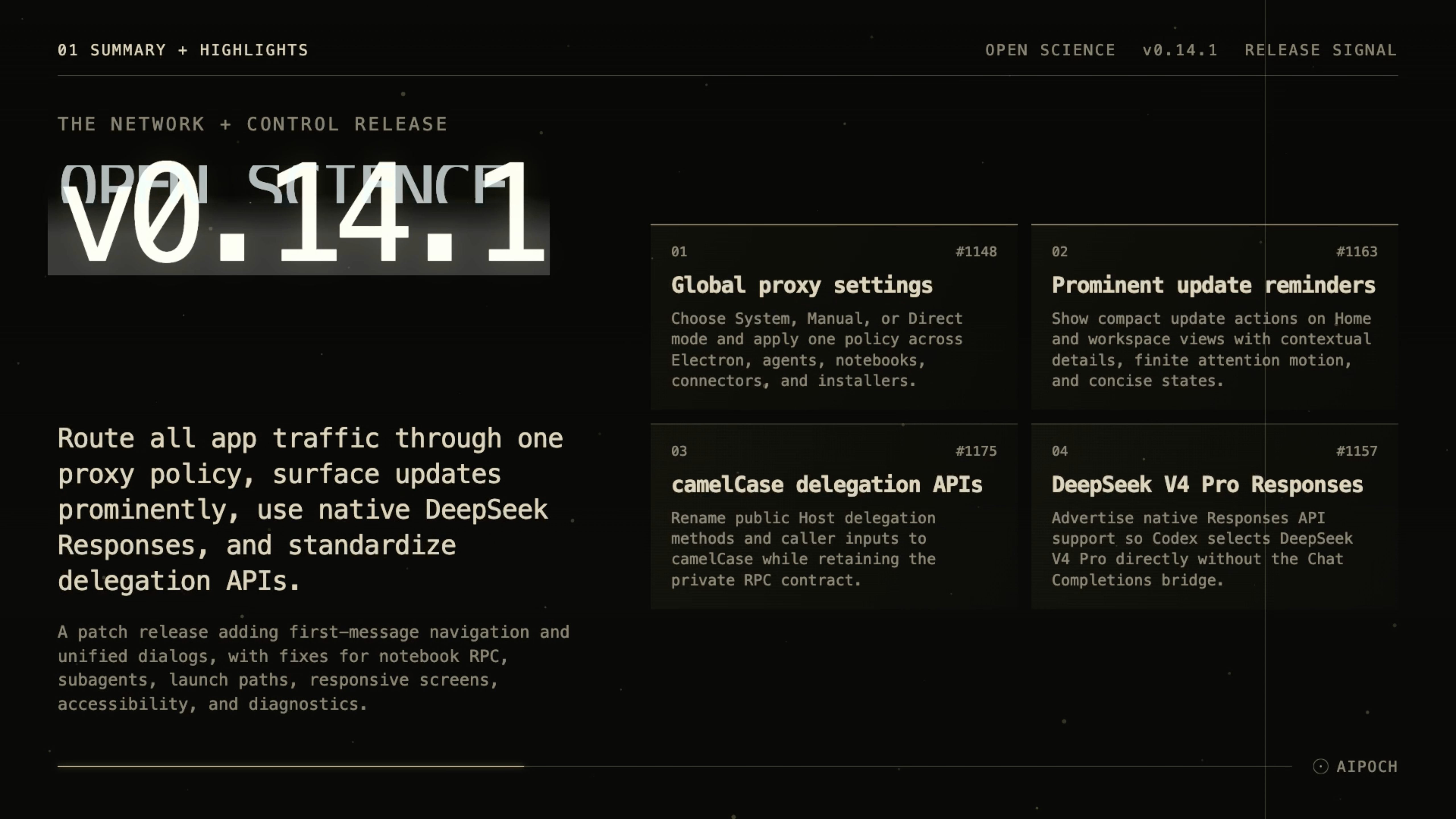
The patch also adds native Responses API routing for DeepSeek V4 Pro, introduces a camelCase migration for the Host delegation API, and fixes subagent persistence, Notebook RPC authentication, daemon log redaction, AppImage CLI paths, onboarding, and accessibility.
Open Science is AIPOCH's open-source, model-agnostic AI workbench for scientific discovery.
What new capabilities help researchers manage network policy, updates, and models?
Global proxy settings
Research environments often sit behind a corporate or institutional proxy, but each part of an AI workbench can have its own idea of how to reach the network. A provider request might work while a connector call fails, or a notebook kernel might use a different proxy than the installer that sets it up.
v0.14.1 adds Settings → Network → Proxy with three modes: System, Manual, and Direct. In Manual mode, the configured proxy applies to Electron networking and is injected into subsequently spawned ACP agents, notebook runtimes, and installer processes. Direct mode clears proxy variables for subsequently spawned child processes. Manual proxy URLs that embed credentials are rejected, and loopback traffic is always bypassed.
The result is one shared proxy configuration across Open Science's Electron networking and subsequently spawned agent, notebook, and installer processes, instead of separate per-component setup. Researchers can run Open Science behind a proxy without chasing down per-component configuration.
Proxy settings control how supported Open Science networking surfaces connect; they are not a network sandbox, firewall, or guarantee that every external binary will obey the same policy.
Prominent update reminders
Available updates are easy to miss when they live only in a menu or status bar. v0.14.1 surfaces update reminders as compact actions on the Home project grid and the workspace session sidebar. Downloading, ready, installer, restart, and retry states are each presented concisely. The attention treatment is finite and respects reduced-motion preferences.
Researchers can see at a glance when a patch is available and act from the context they are already in.
DeepSeek V4 Pro Responses support
DeepSeek V4 Pro and its [1m] variant previously routed through the Chat Completions bridge, which meant the Codex backend could not use their native Responses API capabilities. In v0.14.1, these models advertise native Responses API support, and the Codex backend selects them directly.
Researchers who prefer DeepSeek V4 Pro can now get the native response behavior the model supports. This is a routing and API-compatibility change. It does not by itself claim that the model is faster, more accurate, or better for scientific tasks.
camelCase delegation APIs
The public Host JavaScript delegation interface used snake_case spellings that did not match the rest of the Host SDK. v0.14.1 renames the public methods to camelCase: stopChild, sendFrameMessage, messageReceipt, resolveMessage, and submitOutput. Caller input keys must also use camelCase; legacy snake_case spellings are rejected before transport. The private RPC operation names, wire fields, persisted records, and return projections remain unchanged.
This makes the Host API more consistent and easier to use in notebooks and skills. If you currently call the delegation interface with snake_case method names or input keys, update those calls to camelCase when you upgrade.
Who needs to act? Only users with Notebook code or Skill scripts that call the public Host JavaScript delegation interface using the former snake_case methods or input keys. Normal app usage does not require code changes.
What else is new in v0.14.1?
First-message scroll control
Long conversations make it tedious to return to the start of a branch. A new compact control at the top of the conversation viewport scrolls smoothly to the first message on the active branch. It hides while a session is running or waiting, so it does not get in the way during active work.
What has improved under the hood?
Dialog presentation is unified across the app, the conversation panel has been compacted to reclaim vertical space, and startup loading is instrumented with diagnostics so slow phases can be identified.
Security and local reliability fixes
v0.14.1 tightens two local security boundaries: Notebook RPC authentication now happens before request-body handling, and authenticated service URLs are redacted from daemon logs.
Other reliability fixes in this patch include:
- Running subagent activity preserved. A running subagent's activity could be lost when the parent session underwent certain lifecycle transitions, leaving delegation in a stale state. Activity is now preserved across these transitions.
- CLI AppImage launcher paths stabilized. The AppImage launcher path could resolve to a temporary mount point that changed across reboots, breaking the installed CLI. Paths are now kept stable.
- Narrow-screen onboarding recovered. On narrow screens, certain onboarding steps could fail to render their full content, blocking setup. The layout now recovers gracefully on narrow viewports.
- Remote-access loading and focus recovered. The remote-access loading screen could fail to complete, and the trap operation could lose focus. Both are now recovered.
- Composer accessibility improved. Keyboard navigation and screen-reader labels in the composer have been improved.
- Responsive panel accessibility improved. Side panels could become inaccessible at certain responsive breakpoints. Panel accessibility is now improved across breakpoints.
- Composer review loading state shown. The reviewer's composer loading state was not shown while a review was in progress, leaving users uncertain whether their action was received. The loading state is now shown.
Install or update
Open Science v0.14.1 supports macOS 12+ on Apple Silicon and Intel, Linux x64, and Windows 10/11 x64. Download the package for your platform from the GitHub release page or update in place through the app when the update is offered.
Official macOS builds are Developer ID signed and notarized by Apple. Windows builds are currently unsigned and may show a SmartScreen prompt on first launch.
v0.14.1 is a focused reliability patch: fewer network-configuration mismatches, more visible updates, better model routing, and tighter local security and interface behavior. Download the release from GitHub or update through the app when the new version is offered.
Resources
- Open Science v0.14.1 Release Notes
- AIPOCH Open Science
- AIPOCH
- Open Science v0.14.0 release blog post
FAQ
What proxy modes does v0.14.1 support?
System, Manual, and Direct. System uses OS or PAC resolution. Manual applies a fixed proxy to Electron networking and is injected into subsequently spawned child processes. Direct clears proxy variables for subsequently spawned child processes.
Which models gain native Responses API support in v0.14.1?
DeepSeek V4 Pro and its [1m] variant now advertise native Responses API support, so the Codex backend selects them directly.
Do I need to update my notebook or skill code?
Only if you call the public Host JavaScript delegation interface with snake_case method names or input keys. Update those calls to camelCase, such as stopChild, sendFrameMessage, messageReceipt, resolveMessage, and submitOutput.
What platforms does Open Science v0.14.1 support?
It supports macOS 12+ on Apple Silicon and Intel, Linux x64, and Windows 10/11 x64. macOS builds are signed and notarized; Windows builds are unsigned and may trigger a SmartScreen prompt.
Where do update reminders appear?
Update reminders appear as compact actions on the Home project grid and the workspace session sidebar.
Disclaimer
Open Science is a research workflow tool. It assists with planning, execution, file management, delegation, and provenance tracking, but it does not replace scientific judgment, domain validation, or peer review.