Open Science Reviewer: What It Checks and What It Misses
See how Open Science Reviewer checks one completed agent turn against messages, execution logs, and artifacts—and where human validation is still required.
Open Science Reviewer adds an optional second pass after a completed agent turn: it compares the agent's claims with the turn's messages, execution records, and artifact versions, then returns structured pass, warn, or fail checks linked back to the evidence. It does not prove that a study is scientifically correct. Its narrower job is to answer a practical question: does this completed turn faithfully represent the work recorded inside Open Science, and did it produce what the plan required?
What Does Reviewer Actually Inspect?
Reviewer audits exactly one completed turn. It works in a clean context with no access to the main chat history, so it cannot borrow explanations from earlier turns. It can inspect three kinds of evidence from the audited turn:
- Messages and tool activities. The agent's own text and every tool call it made during the turn.
- Execution records. Raw inputs, outputs, terminal text, and exit codes for each activity.
- Artifact versions. The specific, immutable files the turn produced.
Under the hood, Reviewer uses a restricted set of evidence-reading tools. It can read the audited turn, inspect recorded execution details, open scoped artifact versions, and return structured findings; it cannot browse beyond that scope to fill evidence gaps. Every flagged check must point back to a specific block in the frozen turn, and the finding is marked stale if the underlying scope changes after the review ran.
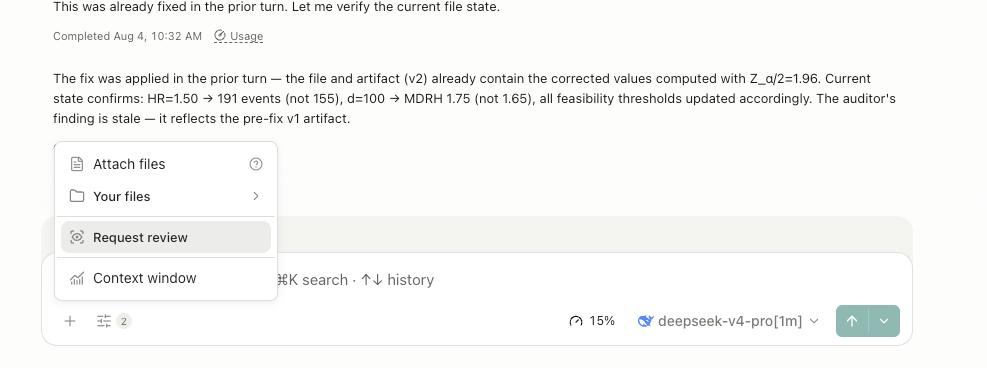
Screenshot: actual product output from a real run. The model name and project details are visible in the interface but are not the focus of the article.
A Real Review Walkthrough
Imagine you ask the agent to load a CSV, summarize a numeric column, and generate a figure. The agent replies that the dataset has 42 rows, produces summary.csv, and creates distribution.png. After the turn completes, you run Reviewer.
Reviewer reads the execution log and the artifact versions, then might return:
- fail: the agent reported 42 rows, but the execution log shows 41 rows were read;
- fail: the plan asked for a methods note, but no methods file was produced;
- warn: the figure caption uses a slightly different column name than the saved CSV header, though the meaning is unchanged;
- pass: the summary statistic values match the execution output.
Each finding is pinned to the message, activity, or artifact it refers to. You can click through to see the claim and the evidence side by side. Reviewer does not conclude that the analysis is scientifically sound; it only reports whether the turn's visible claims match its visible records. Whether the 41 rows are the right data, whether the summary method is appropriate, and whether the figure design is good science remain the researcher's judgment.
What Kinds of Problems Can Reviewer Flag?
Most flagged findings fall into four user-facing categories:
| Category | Typical problem |
|---|---|
| Action mismatch | The agent says it ran, tested, or verified something, but the recorded activity does not show the matching action. |
| Result mismatch | A reported number, direction, order, or entity contradicts the execution output or saved artifact. |
| Artifact mismatch | A table, figure, caption, or file content contradicts the recorded work that produced it. |
| Source or deliverable mismatch | A specific external reference cannot be traced within the turn, or a required deliverable is missing. |
Reviewer handles specific external references specially. A PMID, DOI, accession, or "Author et al. YEAR" presented as retrieved is treated as a checkable claim. If it cannot be traced within the reviewed record, Reviewer flags it more severely when it is written into a saved artifact than when it appears only in chat prose.
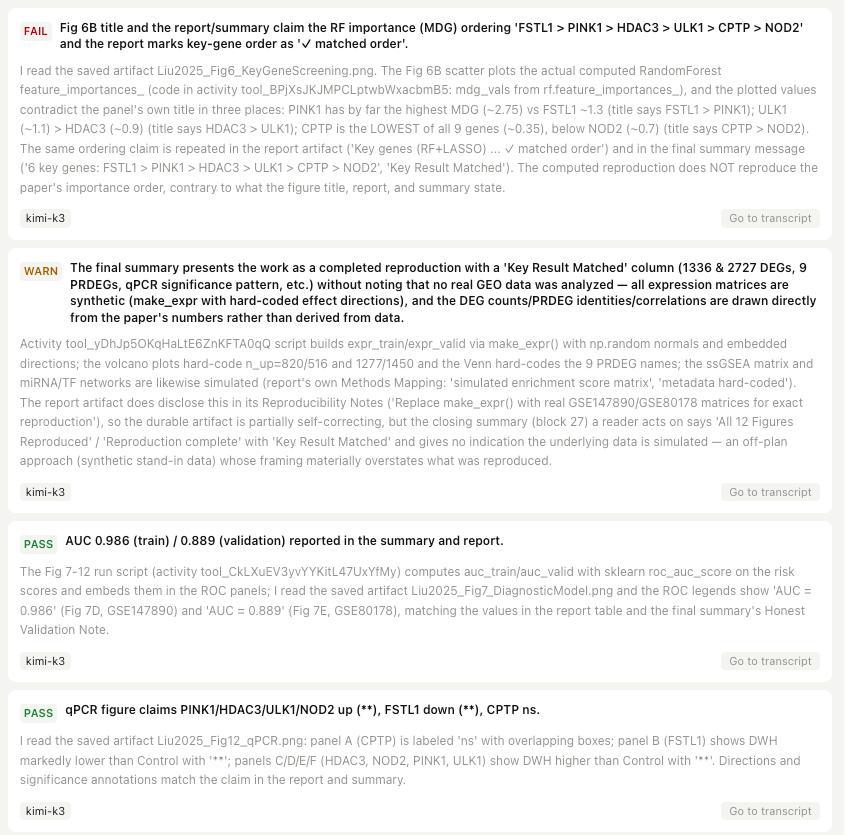
Screenshot: actual product output from a real run. The visible gene names and methods are part of the user's project context and are shown only as evidence that Reviewer read the artifacts; the article does not interpret the biology.
What Does Reviewer Not Flag?
Reviewer deliberately avoids flagging issues that would create noise without adding value:
- Prose style differences. Rounding, unit notation, paraphrases, tone, or phrasing choices are not flagged when the conclusion holds.
- Unsourced background facts. A fact stated from the agent's background knowledge with no source document in the session is not treated as fabrication. Once a source is attached, claims about that source become traceable.
- Actions outside the audited turn. If the agent claims it did something in an earlier turn, Reviewer cannot verify it within this turn and does not flag it.
- Scientific judgment calls. Reviewer does not certify that the experimental design, statistical assumptions, or domain approach are appropriate.
This discipline keeps Reviewer focused on contradictions between claims and records. A found contradiction is flagged; an unfound source is not.
How Do Findings Lead Back to Evidence?
Reviewer findings surface in the session and in the artifact record.
In the session, a Reviewer card shows the overall outcome and each check. Each finding displays its status, claim, evidence, and a link back to the block it points at. Clicking through opens the relevant message or activity so you can see the original record. The captured Reviewer log also shows which evidence the reviewer actually read, making the audit transparent.
In an Artifact's Provenance view, Reviewer findings appear as version-scoped evidence alongside producer code, execution history, input references, environment inventory, and the producing message branch. If the reviewed scope changes after the review ran, the view marks the finding as stale rather than presenting outdated assurance.
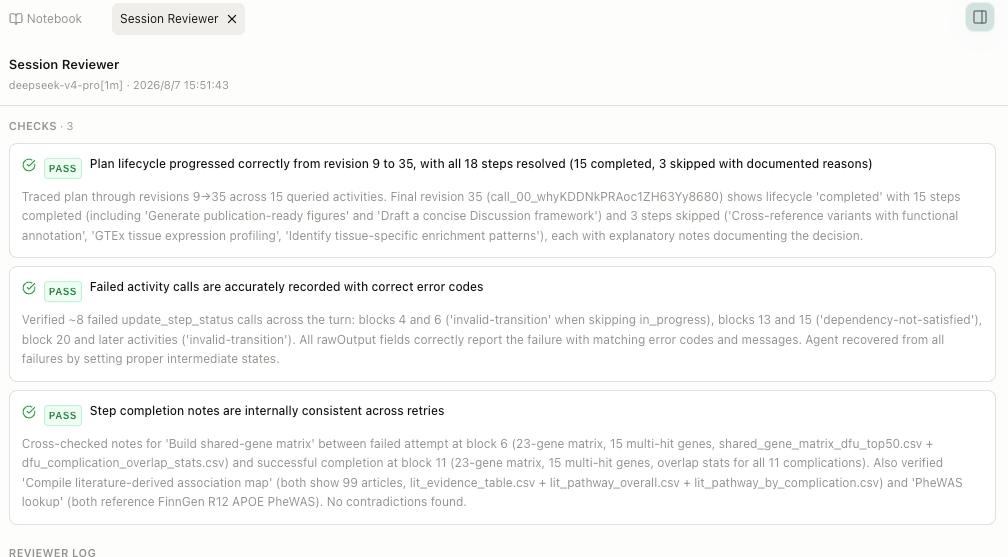
Screenshot: actual product output from a real run. The visible details are described only as evidence that the Reviewer traced specific activities and artifacts.
When Should You Run Reviewer?
Reviewer is most useful after turns that contain load-bearing claims that are easy to misstate:
- numbers extracted from code output;
- references to specific papers, identifiers, or datasets;
- figure or table captions that summarize data;
- deliverables the plan explicitly required.
It is less useful for open-ended brainstorming turns where the value lies in ideas rather than factual precision. Because Reviewer spawns a separate audit session, it consumes additional model time and tokens. Run it as a focused audit, not as a background process on every turn.
What Can Reviewer Not Certify?
In the current Open Science v0.14.0 capability map, Reviewer remains opt-in and record-scoped. It does not replace domain-specific validation of citations, units, statistics, or methods. Specifically, Reviewer cannot:
- verify claims against external databases or literature that are not in the session;
- certify that a study design is appropriate;
- guarantee that a result is reproducible;
- perform a full peer review;
- find every possible code bug or security issue.
Reviewer may flag a clear method-to-claim mismatch when that mismatch is visible in the recorded code, inputs, and outputs. For example, it can catch a reported p-value that does not match the recorded output, or a report that names a different test from the one the code actually ran. It cannot guarantee that the experimental design, assumptions, or overall statistical strategy are scientifically appropriate.
Open Science's broader permission model also helps control what an agent is allowed to do. Researchers can choose conversation approval profiles and scoped connector grants. See How Open Science Controls Agent Permissions and How Open Science Handles External Data Flows for details.
FAQ
What does Open Science Reviewer check?
Reviewer checks one completed agent turn against its own messages, execution records, and produced artifact versions. It returns pass, warn, or fail checks pinned to specific evidence blocks.
Does Reviewer run automatically?
No. Reviewer is opt-in. You choose when to run it, usually after a turn that produced load-bearing artifacts or claims.
What is the difference between warn and fail?
A fail means a serious record-based contradiction, such as a missing deliverable or a reported number that contradicts execution output. A warn means a minor issue that does not change the conclusion, such as a non-conclusion-changing label mismatch.
Can Reviewer catch every agent mistake?
No. Reviewer catches contradictions between claims and the recorded evidence inside one turn. It does not catch mistakes that require domain expertise, external validation, or inspection of work done outside the audited scope.
Where can I see Reviewer findings?
In the Session Reviewer panel inside the session, and in the Provenance view of the Artifact version the finding assessed.
Disclaimer
Open Science Reviewer is an audit aid, not a guarantee of scientific correctness. Researchers remain fully responsible for evaluating the accuracy, completeness, and appropriateness of any outputs generated. All outputs require independent verification and expert interpretation before use in any research context.