Introduction
A specialist AI agent is a reusable role configuration for a defined kind of research work. In Open Science, AIPOCH lets researchers combine role instructions with a selected Skill and Connector set, then apply that profile in a session without presenting it as an autonomous scientific authority.
Open Science is an open-source, local-first, model-agnostic AI research workbench for scientists and researchers. Verified against v0.18.1, it supports inspectable, reproducibility-oriented research workflows across models, execution environments, files, and research artifacts.
The useful distinction is simple: a Specialist sets the working role and the capability context; separate approval and Connector policies govern actions; researchers still judge the evidence. That makes a Specialist practical when a team repeats a method but does not want to rebuild a long prompt and tool selection in every new session.
What Is an Open Science Specialist?
An Open Science Specialist is a named profile with identity, instructions, and either full or selected capability access. It helps turn a recurring research role—such as evidence organizer, data-preparation assistant, or protocol-drafting helper—into a configuration that researchers can revisit and adjust instead of reproducing from scratch.
The profile is more than a pasted prompt because it can also carry a deliberate set of Skills and Connectors. It is less than an independent scientific actor because it does not validate a method, decide a conclusion, or override surrounding safety and action controls. The current product supports personal Specialist profiles, stable identities, conversational customization, and a scoped marketplace. Open Science v0.18.1 lists these profiles as implemented product functionality.
What Are the Four Layers Around a Specialist?
A Specialist sits inside four distinct layers: role instructions, reusable methods, external tool connections, and action controls. Keeping the layers separate prevents a common misunderstanding: selecting a focused role and capability set is useful, but it is not the same as granting permission or isolating every action.
| Layer | Primary job | What it does not decide |
|---|---|---|
| Specialist | Defines a reusable role and selected capability context | Whether an action is approved or scientifically sound |
| Skill | Supplies method instructions, scripts, references, and templates | A persistent agent identity |
| Connector | Exposes named external tools or data sources | Whether retrieved evidence is valid |
| Permission policy | Allows, asks for approval, or blocks an action | The research role or methodology |
The OWASP AI Agent Security Cheat Sheet recommends least-privilege tool access, explicit authorization, observability, and human oversight. A Specialist can support the first of those practices by narrowing the visible capability set; it does not replace the remaining controls.
How Do You Create and Use a Specialist in Three Steps?
Researchers create and use a Specialist by defining the role, choosing its capability scope, and activating it in a controlled session. These are the Specialist-specific actions. Model choice, runtime behavior, Connector policies, files, activity history, and researcher review remain managed by the surrounding Open Science workspace.
1. Define the role
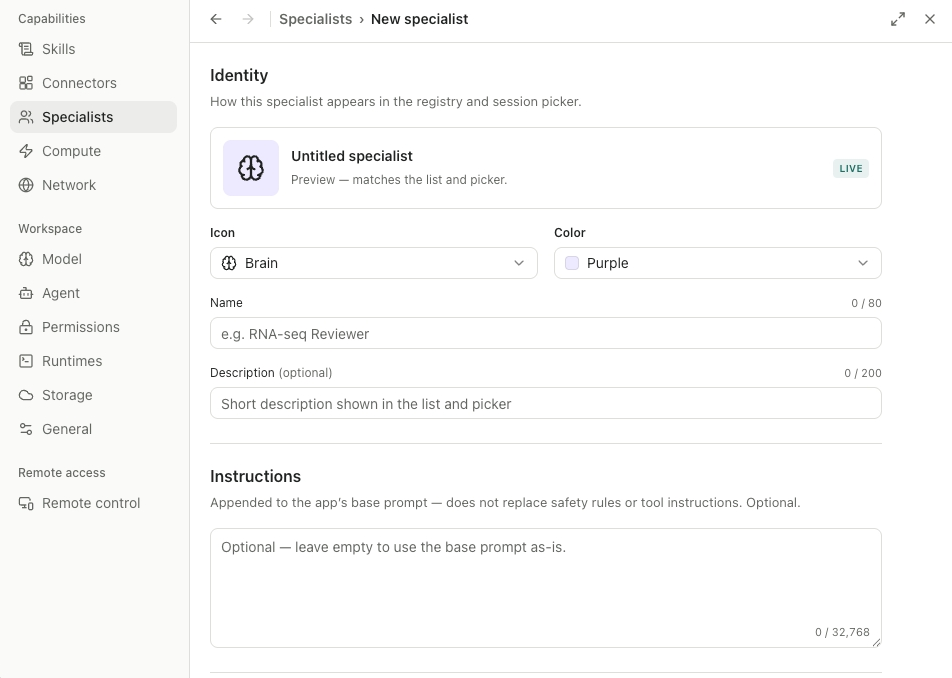
Start with an identity that researchers can recognize later: a name, optional description, appearance, and role instructions. The current interface shows the identity preview and an Instructions field; those instructions are appended to the base prompt rather than replacing safety rules or tool instructions.
Screenshot: actual Open Science interface from AIPOCH feature documentation. Labels and available options can vary by installed version.
The role should describe an operational responsibility, not assert expertise the system has not demonstrated. For example, an Evidence Review Specialist can be instructed to extract stated questions, methods, results, limitations, and unresolved conflicts into a structured table. It should not be instructed to settle conflicting findings or certify an evidence base.
2. Choose the capability scope
Next, select full access or a smaller Skill and Connector set that fits the role. A literature-oriented Specialist might receive a review method Skill and only the retrieval Connectors required for the task. A data-preparation Specialist might receive a method Skill and the relevant file or compute connections.
Scope affects the configured capability context, not the permission outcome of every underlying call. A blocked Connector remains blocked, and a call that needs confirmation still needs confirmation. Open Science v0.18.1 states that scoped permissions cover allow-grants only; network sandboxing, directory-level file controls, and credential isolation remain roadmap work.
3. Activate it in a controlled session
Finally, select the Specialist for the research session and use it as the active role. The product's active-Specialist presentation helps researchers see which profile is in context, while the existing workspace continues to manage the selected model and runtime, approval profile, Connector policies, files, and activity record.
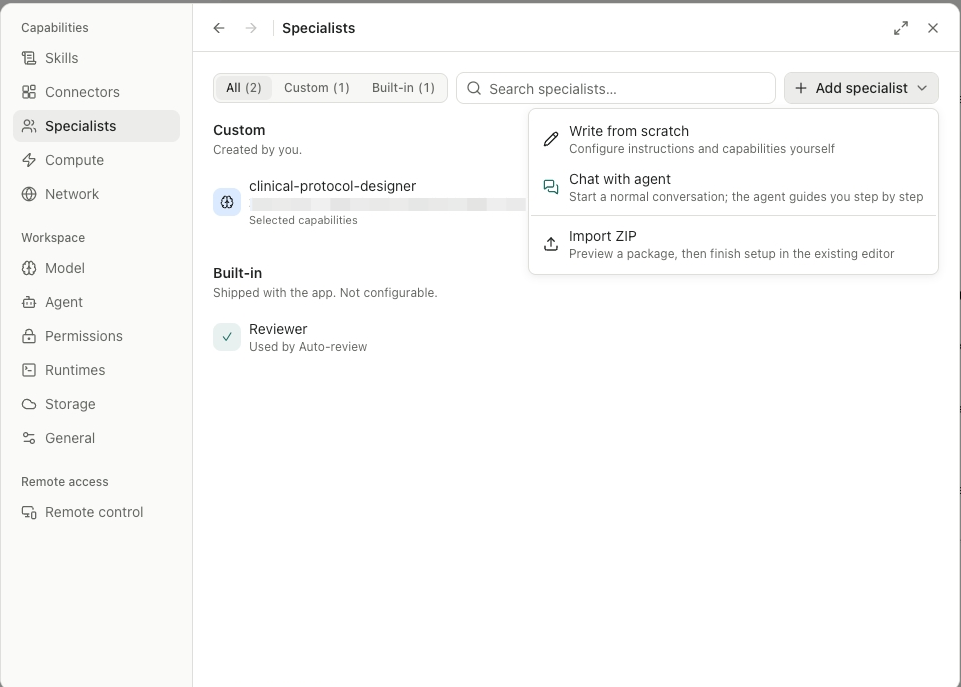
Screenshot*: actual Open Science Specialist list and creation menu from AIPOCH feature documentation. It illustrates the configuration surface, not a runtime result.*
Activating a Specialist changes the role and scoped capability context applied to the current session. This is distinct from starting a separately tracked delegated agent execution. The v0.14.0 release documents production subagent delegation as a different capability with its own lifecycle and evidence.
What Does a Practical Evidence-Review Specialist Look Like?
An Evidence Review Specialist can help organize literature-derived statements into a repeatable working method while leaving inclusion decisions and scientific interpretation to the researcher. The value is not that the profile makes a review complete; it is that it makes the role, tool surface, and expected output visible before the task begins.
For uploaded papers and an evidence-table task, a researcher might configure:
- Role: Extract the stated question, methods, sample description, results, and limitations; flag uncertainty rather than resolve it.
- Skill scope: Include a literature-review method that defines table fields and citation expectations.
- Connector scope: Include only source-access tools needed for the review.
- Session controls: Retain approval requirements for external calls and use the activity record when checking work.
- Deliverables: Produce an evidence table, unresolved conflicts, and a draft outline for researcher review.
This pattern can reduce repetitive setup, but it cannot establish that every relevant paper was found or interpreted correctly. Researchers remain responsible for checking primary sources, choosing inclusion criteria, assessing methods, and deciding how outputs should be used.
How Is a Specialist Different from a Skill, Connector, or Subagent?
A Specialist packages role instructions and a capability scope for the current session. A Skill supplies reusable method materials, a Connector exposes tools or data, and subagent delegation starts separately tracked work. The components can work together, but switching a Specialist does not create a subagent team.
| Component | Primary job | Not a substitute for |
|---|---|---|
| Specialist | Reusable role plus a scoped Skill/Connector set | Permissions, scientific review, or delegated execution |
| Skill | Method instructions, scripts, references, and templates | A persistent agent identity |
| Connector | Callable external tools or data sources | Validation of retrieved evidence |
| Permission policy | Allows, asks for approval, or blocks an action | Research role or methodology |
| Subagent delegation | Starts separately tracked work by another agent execution | Switching the active role in the current session |
The OpenAI Agents SDK orchestration guide makes a similar general distinction between a conversation handoff and agents used for bounded work. In Open Science, the practical user-facing boundary is narrower: activating a Specialist changes session context, while delegation starts a distinct tracked execution.
How Are Specialist Packages Installed?
Specialist packages let researchers distribute a role configuration together with declared Skills and Connectors, without injecting those bundled capabilities into main-agent sessions. The v0.17.0 release introduced the scoped marketplace, verified installation flow, official and user-approved GitHub sources, CDN and cache fallback, and conflict handling for incoming Skills.
The scope boundary is the important part: bundled Skills and Connectors are available only with the selected Specialist. Signature and integrity checks help verify what was installed and where it came from; they do not certify that a prompt, Skill script, Connector, or research method is safe, scientifically valid, or suitable for a particular dataset.
Researchers should inspect the package's instructions, dependencies, Connector definitions, and external data flows before installing it. The product does not yet provide a hosted public Specialist discovery and forking commons, as the v0.18.1 known limitations explain.
What Are the Limits of a Specialist Profile?
A Specialist is not a security sandbox, a new model, a scientific reviewer, or a multi-user collaboration feature. It provides role focus and capability scope, while the rest of the workspace continues to govern action approval, data flow, records, artifacts, and the independent evaluation of research outputs.
- Not complete isolation. Capability selection does not provide network sandboxing, credential isolation, or directory-level file controls.
- Not scientific validation. A Specialist can organize outputs for researcher review but cannot replace primary-source checks, statistical assessment, domain expertise, or peer review.
- Not delegation or collaboration. Separate delegation is needed for tracked work by another agent execution, and real-time multi-user collaboration is not currently available.
Conclusion
An Open Science Specialist turns a recurring research role into a reusable profile with focused instructions and a selected capability context. Its practical benefit is clarity: researchers can see which role is active, which methods and connections are configured, and which controls still govern the work.
The durable mental model is role, capabilities, controls, and review. The Specialist defines the role; Skills and Connectors provide methods and tool access; permission settings govern actions; and researchers evaluate the science. Visit the Open Science product page for the product overview and the GitHub repository for current capabilities.
FAQ
What is a specialist AI agent?
A specialist AI agent is a profile focused on one defined class of work. In Open Science v0.18.1, a Specialist combines an identity, role instructions, and a selected capability context; it still uses the workspace's separate approval controls and requires researcher review.
Can an Open Science Specialist limit which tools an agent sees?
Yes. A Specialist can select Skills and Connectors for its configured scope, while v0.18.1 lists 18 featured Skills and 24 built-in research Connectors in the wider catalog. Connector policies and session approvals still decide whether a particular action can run.
Is a Specialist the same as a subagent?
No. A Specialist changes the active role and capability context of the current session. Open Science v0.14.0 documents subagent delegation as separately tracked work with its own lifecycle, so selecting a Specialist alone does not start delegated execution.
Can I install Specialist packages?
Yes. Open Science supports package import and export, and v0.17.0 added a signed scoped marketplace with official, user-approved GitHub, CDN, and cache paths. Source and integrity checks do not replace inspection of a package's instructions, code, dependencies, or research suitability.
Disclaimer
This article is intended for informational purposes only and does not constitute medical advice, clinical guidance, diagnostic recommendations, treatment decisions, or validated scientific conclusions. The product-interface screenshots illustrate configuration surfaces and do not represent research findings or validated workflow outputs.
Open Science is a research workflow tool. It does not replace researcher judgment, and researchers remain fully responsible for evaluating the accuracy, completeness, and appropriateness of any outputs generated. Specialist profiles can support role definition and capability organization, but all outputs require independent verification and expert interpretation before use in any research context.
References and external links in this article are provided for informational purposes. AIPOCH does not endorse and is not responsible for the content of third-party sources.