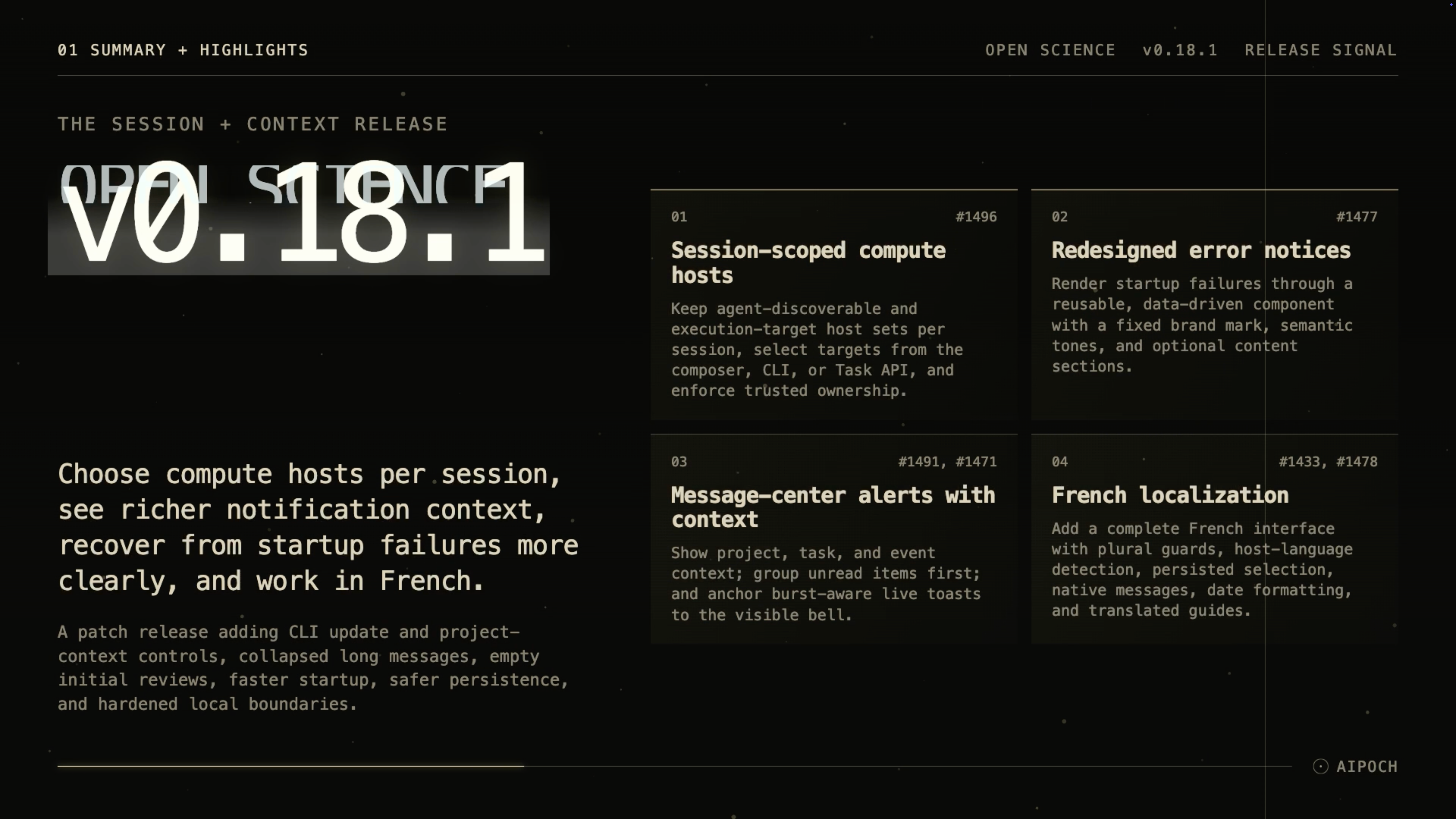
Version 0.18.1 lets researchers choose compute hosts per session, adds richer alert context, and strengthens startup, persistence, and local boundaries.
Open Science is the local-first AI research workbench from AIPOCH, designed to support reproducible execution while keeping research activity and available provenance evidence inspectable.
Published on August 20, 2026, v0.18.1 is a patch release that gives each session clearer control over remote compute, makes active work easier to identify, expands language support, and repairs several persistence, updater, and application-boundary problems.
What new capabilities help researchers control sessions and follow active work?
Session-scoped compute host selection
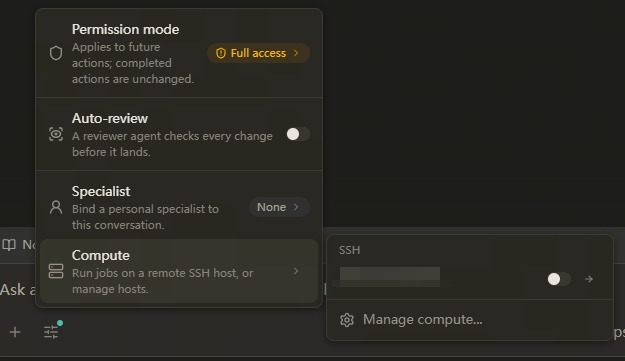
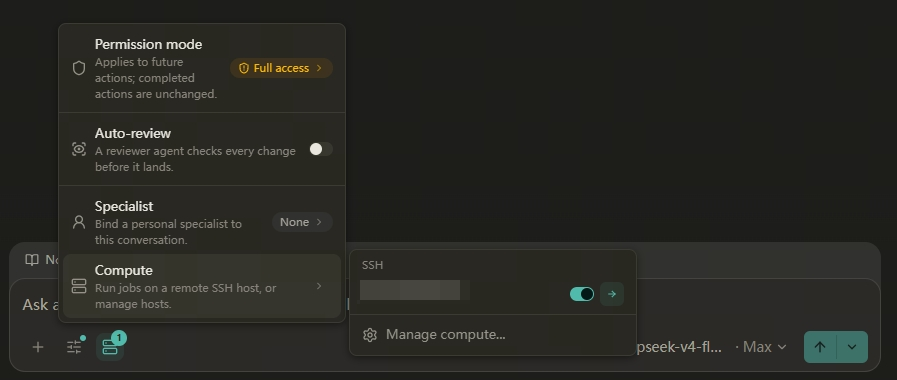
A researcher may use one remote machine for data preparation, another for a long analysis, and local execution for a separate session. When compute-host availability is managed only at a broader level, an agent can discover more targets than the current session needs, and the intended execution target is harder to confirm.
Open Science v0.18.1 gives each session two separate compute-host sets. Enabled hosts are discoverable by the agent, while selected hosts are the current execution targets. Agent-visible hosts are labeled as selected or available, and a compact composer popover lets the researcher inspect and change the selected targets for that session.
The CLI and Task API also accept repeatable --compute-host selections when creating or continuing a session. These commands choose from hosts that have already been configured; host creation, credential setup, probing, editing, and deletion remain desktop-only. Host operations check trusted project, session, and provider ownership. This separation makes the execution target explicit without turning the CLI into a remote-host administration surface.
Message-center alerts with project and task context
An alert is difficult to act on when it does not identify the project, session, or event that caused it. In v0.18.1, message-center rows show project context, the task or session title, and a one-line event preview.
Unread items are grouped first while retaining newest-first order. After an item is read, it returns to chronological placement. A six-second live toast is anchored to the currently visible notification bell, can pause on hover or focus, re-anchors after navigation, and aggregates bursts of events. Deleted sessions retain a stable unavailable-context label rather than presenting a misleading active target.
Researchers can therefore see what needs attention and where it belongs before leaving the current workspace.
Redesigned startup error notices
Startup failures previously depended on error-specific presentation, making important recovery information harder to present consistently. Version 0.18.1 introduces a reusable, data-driven error-notice component with a fixed brand mark, semantic tone palettes, and optional title, description, and error-code sections.
The database startup gate is the first surface to use the component. The design can support other error surfaces in later implementations, but this release only documents the startup-gate application as implemented. Researchers receive a clearer failure state when the application cannot complete database startup.
Empty initial reviewer checks when nothing is checkable
Greetings, acknowledgments, and clarification turns do not always contain a scientific or computational claim that can be reviewed. Requiring a passing check in those cases can create the appearance of validation where no substantive assessment occurred.
The reviewer in v0.18.1 can return zero checks for an initial assessment when the completed turn contains nothing checkable. A tracked recheck still requires the exact tracked check set. This produces a more accurate distinction between “nothing to review” and “a reviewed item passed,” while review remains opt-in and record-scoped.
French interface and project guides
French-speaking researchers can now select a complete French interface with plural-category handling, host-language detection, persisted language choice, native main-process messages, and localized date formatting.
French joins Simplified Chinese, Traditional Chinese, Japanese, and Korean. Matching translated project guides are also available, giving researchers setup and contribution information in the same language as the interface.
CLI application updates and project agent context
Researchers using headless or terminal-driven workflows need to maintain the application and project instructions without opening every settings screen. Open Science v0.18.1 adds open-science update, including a --json mode, to run the existing check, download, verification, and apply workflow from the terminal.
Project creation accepts agent context directly or from a file, and a new project update command can change the project name, description, or agent context, including explicit context clearing. These controls are carried through the SDK and HTTP Task API with optimistic concurrency. Public project responses expose whether agent context exists without returning its contents.
This gives scripted workflows a bounded way to maintain application versions and project instructions while preserving the established update and concurrency paths.
What else is new in v0.18.1?
- Long user messages collapse after 12 rendered lines and provide an accessible Show more/Less control. Attachments remain outside the collapsed region, and structured prompts use a plain-text summary.
- The Imported Skills group gains an Import dropdown with upload, GitHub, and installed-folder actions shared with the Add Skill menu.
- Settings panels are cached and loaded only when needed, reducing the cost of moving through settings.
- Runtime probes are reused during startup with session-recovery tracing, shortening the application critical path.
- Windows end-to-end checks run faster.
- The README has a clearer structure for search and AI citation discovery.
Bug fixes that affect daily use
- Connector outputs now enter artifact provenance. Files written through writable Connector filesystems are published as artifacts with recorded identities, so available provenance evidence can include Connector-produced outputs.
- Concurrent session edits reconcile more safely. Disjoint changes to messages and branches are merged instead of one change overwriting the other.
- Blocked updates provide recovery guidance. When a pending installation prevents a new update, the updater now explains the recovery path.
- Revision conflicts are returned as typed outcomes. Session revision conflicts no longer surface only as generic errors, giving callers a clearer state to handle.
- Streaming tool cards keep their layout. Tool cards no longer shift the surrounding content when they arrive during streaming.
- Local HTTP boundaries are hardened. The release strengthens local HTTP handling without claiming that the application is a complete network sandbox.
- Artifact downloads publish atomically. A downloaded artifact is not exposed as a completed publication before its write finishes.
- Deterministic provider errors stop retrying. Responses that will not succeed through repetition no longer continue a retry loop.
- Stop state stays with its session. A stop condition is scoped to the relevant session instead of affecting unrelated work.
- Stale edits cannot create resources. An outdated edit request can no longer produce a new resource after its expected state has changed.
- Notebook package caches avoid incompatible paths. Micromamba caches avoid non-ASCII paths that can break some toolchains.
- Collapsed message previews align correctly. Preview presentation now matches the new long-message behavior.
Install or update
Open Science v0.18.1 is available for:
- macOS 12 or later on Apple Silicon or Intel: download the matching DMG.
- Linux x64: download the AppImage or Debian package.
- Windows 10 or 11 x64: download the Windows installer.
Choose the package from the Assets section of the Open Science v0.18.1 release. The onboarding wizard can inspect the environment and configure an app-managed agent runtime. An existing installation can update in place, and v0.18.1 also exposes the established update workflow through open-science update.
Official macOS release builds are Developer ID signed and notarized. The Windows build does not yet have an Authenticode certificate, so SmartScreen may show an “unrecognized app” prompt. Confirm that the installer came from the official release page before continuing.
Resources
- Open Science v0.18.1 release notes and downloads
- Open Science product page
- AIPOCH
- AIPOCH Blog
- Open Science v0.18.0: Organize Capabilities and Configure Specialists Faster
- How to Organize a Research Project in Open Science
- How Open Science Extends a Research Agent
FAQ
Is Open Science v0.18.1 a feature or patch release?
It is a patch release published on August 20, 2026. It adds session-scoped compute selection, clearer notifications and startup errors, French localization, terminal update controls, and reliability fixes.
What is the difference between an enabled and selected compute host?
An enabled host is discoverable by the agent in the current session. A selected host is also an active execution target. A host can be available to the agent without being selected for execution.
Can the v0.18.1 CLI create or configure a compute host?
No. The CLI and Task API can select already-configured hosts with repeatable --compute-host inputs when creating or continuing sessions. Host creation, credentials, probing, editing, and deletion remain desktop-only.
Which operating systems support Open Science v0.18.1?
The release provides packages for macOS 12 or later on Apple Silicon and Intel, Linux x64, and Windows 10 or 11 x64.
Does an empty reviewer check set mean a turn was scientifically validated?
No. In v0.18.1, an empty initial check set means the reviewer found nothing checkable in that turn. It is not a passing scientific assessment, and the reviewer does not replace independent validation.