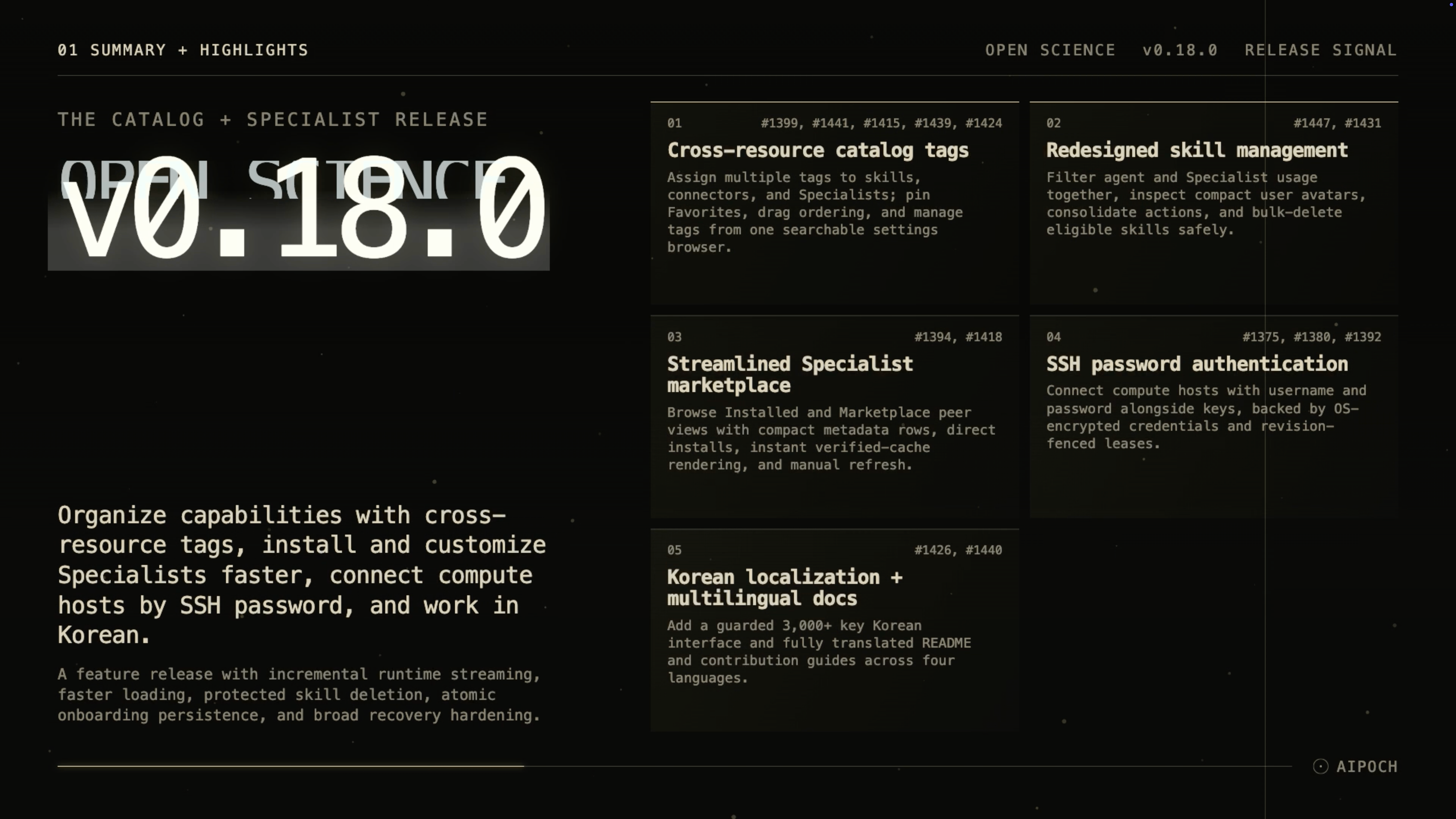
Version 0.18.0 makes growing capability catalogs easier to organize, shortens Specialist setup, and adds password-based SSH access for remote compute.
Open Science is the local-first AI research workbench from AIPOCH, built to help researchers execute work across models while keeping activity and available provenance evidence inspectable.
Published on August 19, 2026, v0.18.0 is a feature release focused on organizing Skills, Connectors, and Specialists; reducing friction in Specialist management; widening remote-compute authentication options; and improving recovery across the application.
What new capabilities help researchers organize and extend their workbench?
Cross-resource catalog tags and Favorites
As a workbench accumulates Skills, Connectors, and runnable Specialists, separate catalogs can become harder to scan. Open Science v0.18.0 lets each resource belong to multiple tags and adds a protected, localized Favorites tag for frequently used capabilities.
Researchers can assign tags from resource panels and detail views, filter catalogs by tag, unlink a tag directly from a resource row, and open a tagged resource from the tag browser. Settings → Capabilities → Tags provides one place to create, edit, search, and delete tags while showing resource-type counts.
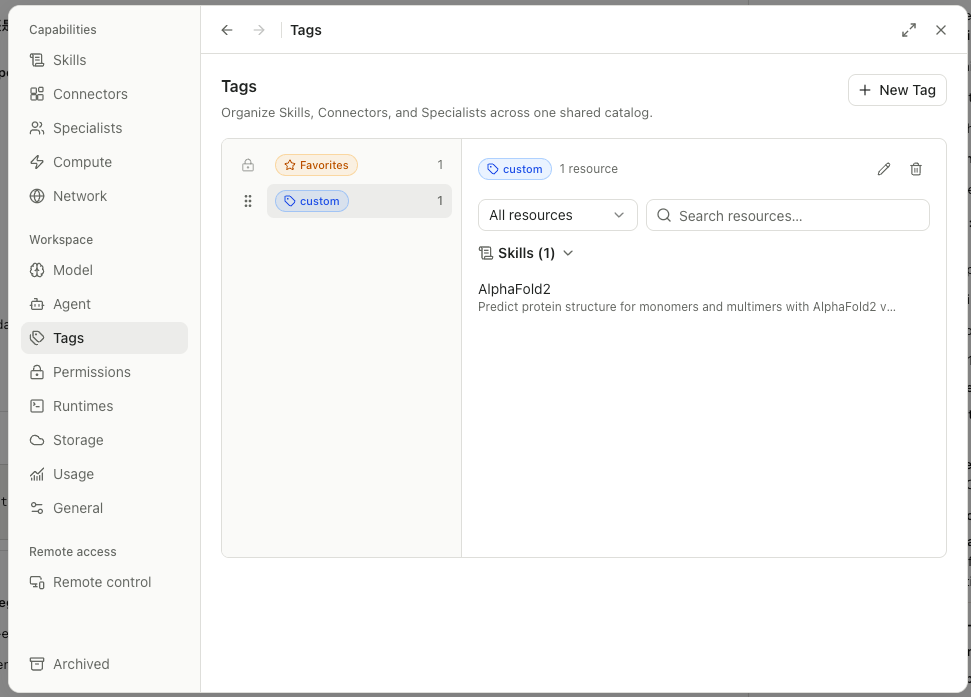
Tag order can be changed with pointer, touch, or keyboard drag controls. Favorites remains first, new tags append to the list, and saved ordering persists. This gives researchers a flexible catalog structure without forcing a Skill, Connector, or Specialist into only one category.
Redesigned Skill management
When the same Skill is available to the main agent and multiple Specialists, long scope labels can make it difficult to see who actually uses it. The redesigned Skills panel combines agent and Specialist filtering, places search and filters in a compact toolbar, and represents actual users with avatar stacks and a bounded “Used by” popover.
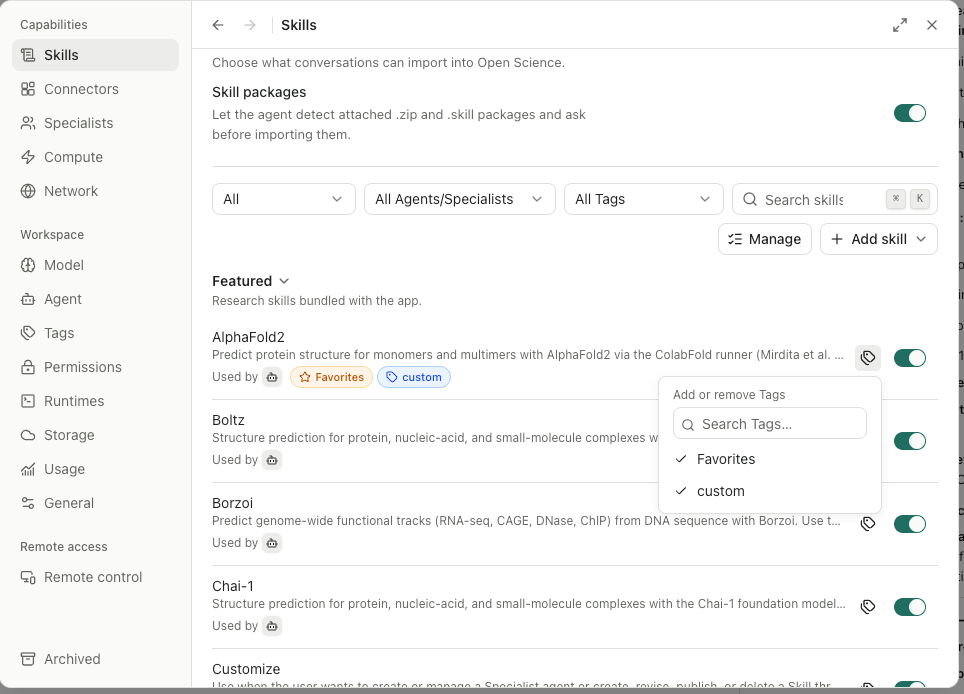
Row actions are consolidated into a menu, and named Specialist entries link to the corresponding settings page. Confirmed bulk deletion is available for personal and imported Skills, while built-in and Specialist-linked Skills remain protected. If a Skill is used only by one Specialist, deleting that Specialist can remove the exclusively used Skill with it.
The result is a clearer view of Skill ownership and safer cleanup when a personal catalog grows.
Faster Specialist discovery and installation
Repeatedly reopening a marketplace should not require waiting for the same remote catalog to load. In v0.18.0, Installed and Marketplace are peer views, listings use compact rows with author, version, and source metadata, and installation proceeds directly from the detail view without an extra review page.
A verified marketplace snapshot is cached and can render immediately on re-entry. A visible refresh action requests current listings, with the cache available as a fallback when the network is weak. This supports quicker browsing while keeping the source and refresh state visible.
Quick Specialist appearance editing and capability navigation
Researchers often use several Specialist profiles and need to distinguish them at a glance. A shared set of 32 icons, grouped across science, research, role, and engineering themes, now powers Specialist avatars and appearance controls.
For a custom Specialist, selecting the avatar opens a compact icon-and-color picker, so a visual change does not require opening the full editor. Inside the editor, selected Skill and Connector rows can navigate to their matching settings details. These controls make it easier to recognize a Specialist and inspect the capabilities attached to it.
SSH password authentication for remote compute
Some research servers support username-and-password access rather than requiring an SSH key. Open Science v0.18.0 adds an explicit password authentication mode alongside key-based access for registered compute hosts.
Password credentials are retained as operating-system-encrypted ciphertext in a main-process-owned record. The connection flow includes revision-fenced leases, centralized error classification, and settings actions for setup, reset, authentication switching, recovery, and removal. Authentication changes also trigger a new connection probe.
This lets researchers connect to more existing SSH environments while keeping the current remote-compute boundary: Open Science connects to a host the researcher already controls; it does not provision cloud infrastructure or manage a cluster scheduler.
Korean interface and multilingual project guides
Researchers who prefer Korean can now select a complete Korean interface, including native Electron messages, date formatting, and persisted language choice. Korean joins Simplified Chinese, Traditional Chinese, and Japanese in the localized application.
The repository also provides translated README and CONTRIBUTING guides in those four languages, linked from a five-language switcher in the root README. This expands access to setup and contribution information without changing the English source documentation.
What else is new in v0.18.0?
- The composer gives the active Specialist greater visual emphasis, helping researchers confirm which profile is guiding the current session.
- Connector catalog actions now follow the same interaction patterns as the redesigned Skill manager.
- Runtime events stream incrementally instead of arriving as large snapshots, reducing event-drain stalls.
- Fewer Connector round trips are required when preparing agent context, which speeds session startup.
- Project operation queues are isolated by project, improving persistence throughput when several projects are active.
- The README introduction and Quick Start have been rewritten for clearer setup guidance.
Bug fixes that affect daily use
- Preview changes are less likely to be lost. Concurrent preview-state writes are now serialized instead of being allowed to interleave.
- Fatal startup states terminate cleanly. A fatal main-process error now exits rather than leaving the application in an undefined state, and a database startup gate can recover after an IPC rejection.
- Onboarding storage choices persist atomically. An interrupted first-run flow should no longer leave a partially written data-root selection.
- Session and notebook state receive stronger recovery protection. Interrupted turn admission no longer deadlocks later turns, recoverable flush failures stop quit before data is lost, and a failed persistence write no longer discards notebook kernel state.
- The updater protects completed work. Installation is gated on a ready state, and completed downloads are retained during update checks.
- Remote access fails closed on unreadable configuration. Shutdown is fenced from in-flight remote operations, and a remote information-disclosure path has been addressed.
- CLI process cleanup checks stale identifiers. Process-tree termination now verifies stale PIDs before acting, reducing the risk of targeting an unrelated process that reused an identifier.
- Compute cleanup is bounded. SSH runner termination and cleanup waits no longer continue without a limit.
- Catalog state is more consistent. Specialist appearance saves finish before catalog refresh, and Marketplace provenance is distinguished correctly.
- Settings and workspace recovery are clearer. Raw IPC errors are hidden from project load and delete flows, settings failure recovery and keyboard access are improved, and several locale and compute translations are corrected.
Install or update
Open Science v0.18.0 is available for:
- macOS 12 or later on Apple Silicon or Intel: download the matching DMG.
- Linux x64: download the AppImage or Debian package.
- Windows 10 or 11 x64: download the Windows installer.
Choose the package from the Assets section of the Open Science v0.18.0 release. The onboarding wizard can check the environment and configure an app-managed agent runtime, and an installed app can update itself in place.
Official macOS release builds are Developer ID signed and notarized. The Windows build does not yet have an Authenticode certificate, so SmartScreen may show an “unrecognized app” message; confirm that the installer came from the official release page before continuing.
Resources
- Open Science v0.18.0 release notes and downloads
- Open Science product page
- AIPOCH
- AIPOCH Blog
- How Open Science Extends a Research Agent
- How to Organize a Research Project in Open Science
- How Data Flows Through Open Science
- What Is Open Science? A Local-First, Model-Agnostic AI Research Workbench
FAQ
Is Open Science v0.18.0 a patch or feature release?
It is a feature release, published on August 19, 2026. Its main additions cover cross-resource tags, redesigned Skill management, Specialist marketplace and appearance controls, SSH password authentication, and Korean localization.
Can Open Science v0.18.0 connect to an SSH host with a password?
Yes. v0.18.0 supports explicit username-and-password authentication alongside key-based authentication for compute hosts. You must register and control the SSH host; Open Science does not create the server for you.
Which operating systems support Open Science v0.18.0?
The release provides packages for macOS 12 or later on Apple Silicon and Intel, Linux x64, and Windows 10 or 11 x64.
Does the cached Specialist marketplace work without a current network response?
A previously verified marketplace snapshot can render immediately when you return to the Marketplace, and the interface provides a manual refresh action. Installing or retrieving current remote content can still require network access.
Do catalog tags change the underlying Skills, Connectors, or Specialists?
No. Tags organize and filter catalog entries; a resource can belong to several tags. Removing a tag assignment does not remove the resource itself, while resource deletion cleans up its tag assignments.