Message Branches, New Sessions, and Side Conversations in Open Science
Open Science provides three related ways to keep exploratory work from derailing the main thread: message branches, Branch in new session, and Side Conversations. They differ in scope, context, and persistence; only the first two are conversation-branching mechanisms.
Research rarely follows a straight line. You may want to re-run an earlier prompt with a different threshold, promote a promising answer into its own investigation, or ask a clarification question without polluting the main record. Open Science, an open-source, local-first, model-agnostic AI research workbench from AIPOCH, provides three related ways to keep exploratory work from derailing the main thread: message branches, Branch in new session, and Side Conversations. They differ in scope, context, and persistence; only the first two are conversation-branching mechanisms.
This article explains what each mechanism does, when to use it, and where the limits are. It is based on the Open Science v0.16.0 release notes and the current default-branch source of the aipoch/open-science repository.
Three Ways to Keep Research Paths Organized
The fastest way to choose is to match your goal to the mechanism:
| Your goal | Use this |
|---|---|
| Re-run an earlier user prompt and compare the new answer with the old one | Message Branch |
| Promote one completed agent answer into its own multi-turn investigation | Branch in new session |
| Ask a clarification or meta-question without entering it into the main research record | Side Conversation |
All three live inside a project, but they handle context, tools, and provenance differently. Message branches and new sessions run the full research Agent and can produce artifacts. A Side Conversation runs a separate, restricted Agent session that cannot access the research workspace or execution tools.
One Research Scenario, Three Choices
Imagine you are replicating a differential-expression analysis. You ask Open Science to compare two conditions at a 0.05 threshold, and the Agent returns a list of candidate genes.
- You wonder what happens at a 0.01 threshold. Edit the completed user prompt and resend it; Open Science creates a message branch that keeps the 0.05 answer available for comparison.
- One candidate looks like a false positive driven by a single outlier. You want to inspect raw counts, plot the sample, and run a sensitivity test across several thresholds. That will take multiple turns, so you choose Branch in new session from the agent message and promote it into its own investigation.
- While reviewing the branch output, you are unsure what "adjusted p-value" means in this context. You open a Side Conversation, ask for a definition, and relay the clarification back to Main as advisory context when you continue.
The same pattern—re-run, promote, clarify—applies to simulation parameters, model selection, or literature extraction. Match the depth of the follow-up to the mechanism.
What Is a Message Branch in Open Science?
A message branch is an alternative path inside the same session, created when you edit a completed user message and resend it. The original downstream path remains available through branch navigation.
Use a message branch to rerase a prompt, try a different parameter, or compare a new answer with the old one without promoting the alternative into its own session.
Each branch has its own message history from the fork point onward, while sharing the project Files Library and session-level context up to that point. Artifact versions produced on different branches remain linked to the branch that produced them; Artifact Provenance identifies the producing branch context, and View in context returns to the artifact's origin Session.
When Should You Branch Into a New Session?
Branch into a new session when one completed agent answer deserves its own independent investigation. Open Science v0.16.0 adds Branch in new session actions on every completed agent message footer; selecting it creates a new idle session inside the same project with the conversation graph and activity history copied through that message.
Use it when a single answer opens a new sub-task that will take multiple turns, when you want to keep the original session focused, or when a different Specialist or separately scoped follow-up task should continue the work.
The new session does not send a prompt automatically. It carries the context through the selected message, so you do not have to re-upload files or re-explain the task, while the original session remains untouched. For more on project structure, see How Open Science Organizes Projects and Sessions.
Unlike a message branch, this creates a separate session with its own running state and artifact lineage.
What Is a Side Conversation in Open Science?
A Side Conversation starts a separate, persistent but tightly restricted Agent session attached to the parent Session. It receives a bounded snapshot of the main conversation, cannot access the research workspace or execution tools, and only sends advisory text back to Main when the user explicitly requests a relay.
Key properties:
- Own history stored separately from the main transcript.
- Can answer clarification questions through a restricted model turn.
- Cannot inspect files, run code, call research tools, or independently modify the main research record.
- Pauses parent-session interactions while open.
- Relayed text enters the next real Main turn as origin-marked advisory context, not as a new approval or authorization.
- Closing it does not copy its whole transcript into Main.
A Side Conversation is not parallel research execution. It does not create research artifacts or enter Artifact Provenance.
How Do the Three Mechanisms Compare?
| Mechanism | Where it lives | Context | Can run research tools? | Artifact / Provenance effect | Best for |
|---|---|---|---|---|---|
| Message Branch | Same Session graph | Shared ancestry to edited user message | Yes, through the main Session Agent | New outputs retain their producing branch context | Re-running an earlier prompt differently |
| Branch in new session | Separate Session in the same Project | Copied graph/activity through selected Agent message | Yes, through the new Session Agent | New artifacts belong to the new Session and its later path | Promoting a result into a sustained investigation |
| Side Conversation | Restricted child conversation attached to parent Session | Bounded snapshot of Main plus its own history | No; relay-to-Main only | Does not create research artifacts; explicit relay becomes origin-marked advisory context | Clarification and meta-discussion |
Branch in New Session copies context to a new Session 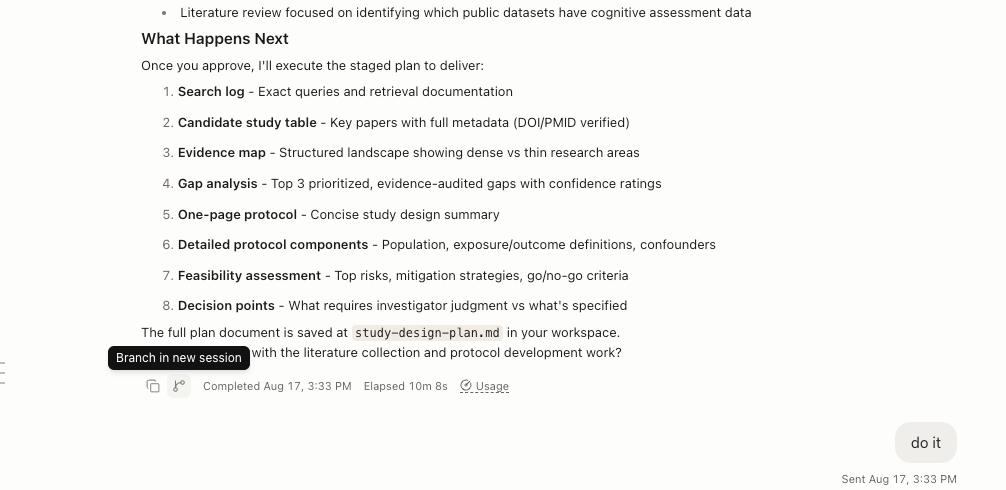
Message Branch stays in the same Session graph
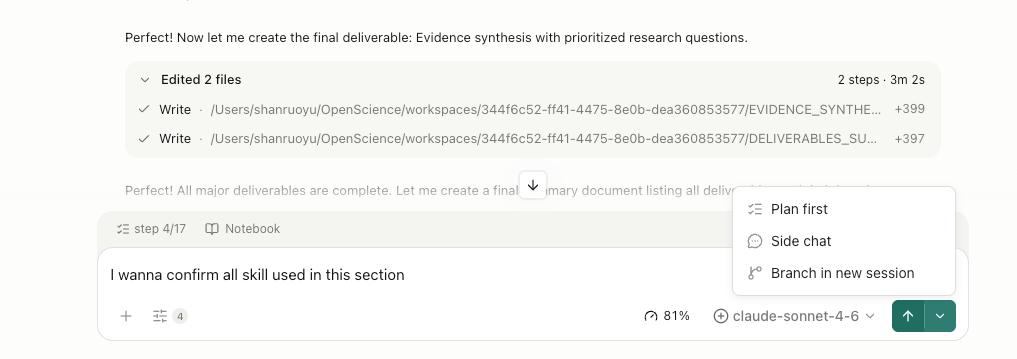
Side Conversation is a restricted child conversation with bounded context
)
A message branch compares answers to the same prompt; branch into new session promotes an answer into its own investigation; a Side Conversation asks a question without polluting the main thread. Branching sits on top of the core Plan → Execute → Artifact workflow: each branch is an alternative path through the same inspectable research loop.
Context, Tokens, and Shared External State
Creating a branch or a new session does not immediately call the model. Once you continue a branch, however, its inherited history may contribute to that turn’s context and token usage. Open Science records context trends by branch and provides compaction controls to help manage—not eliminate—that cost.
When context grows large, Open Science can run context compaction. As of v0.16.0, automatic compaction is available for Claude Code and OpenCode runtimes; Codex manages compaction against its own threshold. Manual compaction is also available from the context-usage indicator. Compaction reduces the length of context the model receives, but the durable record remains available in the session and Files Library. For details on execution environments, see How Open Science Runs Python, R, REPL, and Shell Code.
Branches also share the project Files Library and execution environments. If one branch installs a package or writes a file, that change is visible to other branches in the same project. A branch is not an isolated workspace; it is a selectable path through the same research record.
What Branching Does Not Prove
Branching is a navigation and organization mechanism, not a scientific validation tool. It does not prove correctness, duplicate external state, or compress context losslessly. It also is not parallel research execution: only one prompt interaction runs in a main Session at a time, while a Side Conversation uses a separate restricted runtime and ordinary Sessions have their own runtime state. Branching preserves alternative paths; it does not tell you which path is right.
FAQ
What is the difference between a message branch and a new session?
A message branch is an alternative path inside the same session. A new session is a separate conversation row in the same project. Use a message branch to compare answers to the same prompt; use branch into new session when an answer deserves its own multi-turn investigation.
Can a Side Conversation run research tools or create artifacts?
No. A Side Conversation is a restricted child conversation that cannot access the workspace, shell, files, web, Skills, Compute, Delegation, or child-Agent capabilities. It can only send advisory text back to the Main thread when the user explicitly requests a relay.
What happens to the original conversation when I create a branch?
Nothing is deleted. The original downstream path remains intact and selectable. Message branches live alongside the original; branch into new session copies context into a new session while leaving the source session unchanged.
Disclaimer
This article is intended for informational purposes only and does not constitute medical advice, clinical guidance, diagnostic recommendations, treatment decisions, or validated scientific conclusions. Sample data, workflow outputs, and parameter values shown are illustrative and do not represent any validated research finding or real-world result.
Open Science is a research workflow tool. It does not replace researcher judgment, and researchers remain fully responsible for evaluating the accuracy, completeness, and appropriateness of any outputs generated. All outputs require independent verification and expert interpretation before use in any research context.
References and external links in this article are provided for informational purposes. AIPOCH does not endorse and is not responsible for the content of third-party sources.
Verified against the Open Science v0.16.0 release notes and the default-branch design documentation. Interface details may change; refer to the installed app and current release notes for the latest behavior.