Open Science from AIPOCH puts execution inside the project record. As of the v0.13.1 release on August 11, 2026, the agent can run Python, R, REPL operations, shell commands, and remote SSH jobs through configured runtimes. Code, output, errors, commands, and generated files remain visible alongside the session and can contribute evidence to an Artifact's Provenance.
Generating code is not the same as running it. In a normal chat workflow, a model may return a Python script or an R snippet, but the researcher still has to copy it into another tool, select an interpreter, install packages, fix paths, run the code, collect the output, and reconnect the result to the original conversation.
Choose the Right Execution Surface
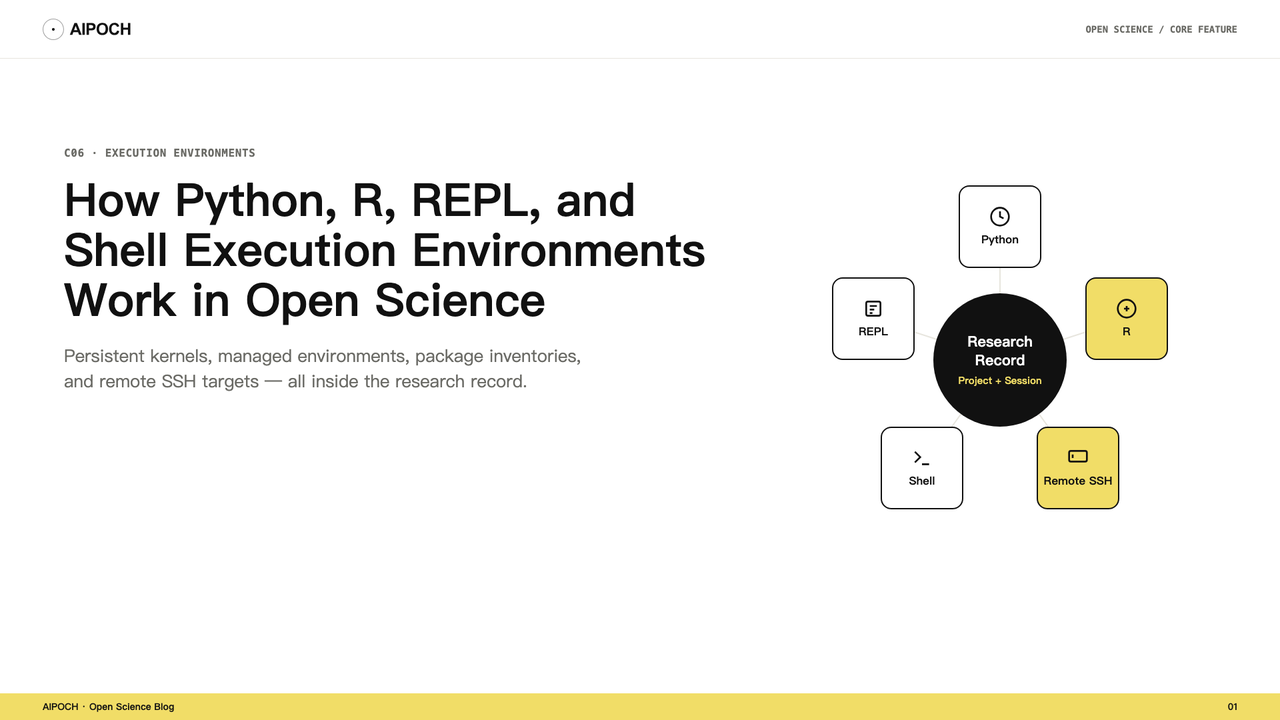
Open Science exposes five execution surfaces. The right choice depends on whether you need language state, a quick inline check, or a one-off operating-system command.
| Surface | State model | Typical use |
|---|---|---|
| Python | Persistent kernel during the active runtime | Data cleaning, analysis, visualization, file generation |
| R | Persistent managed kernel | Statistical analysis, R packages, tables, and figures |
| Persistent REPL | Persistent read-evaluate-print control channel | Interactive operations and stateful tool coordination |
| Bounded evaluator | Bounded, short-lived JavaScript evaluation | Quick calculation, logic check, or small JSON transformation |
| Shell | Stateless command execution | Inspecting files, running scripts, checking tool versions |
“Persistent” does not mean that an in-memory variable is guaranteed to survive every restart, runtime replacement, or remote failure. It means work can continue against a long-lived kernel during the active runtime, while the code and output history remains durable for later inspection.
Python:
R:
Persistent Kernels vs. Stateless Commands
Python, R, and the persistent REPL use control-plane runtimes with durable code and output history. Because the kernel is persistent, later cells or agent actions can reuse objects created earlier in the active runtime. For example, the agent can load a dataset, create a cleaned table, then generate several figures without reading and parsing the file from scratch each time.
The durable Notebook history records the submitted code and its output. If the code raises an exception, the error remains part of the execution history rather than disappearing behind the final answer. This helps with debugging and auditability, but it does not make hidden state harmless. If a result depends on an earlier variable mutation that is not obvious in the final cell, the researcher still needs to review the preceding history.
Shell commands are different. They are stateless operations recorded in the run history. Stateless describes process state, not the project filesystem: files written by one command can remain in the workspace even though shell variables, cd, and running processes are not implicitly carried forward. For reliable shell steps, use explicit paths, declare required environment variables in the relevant command, and inspect both standard output and standard error.
Two REPL Paths, Not One
Open Science exposes two REPL-related paths, and it is important not to confuse them.
The notebook runtime includes a persistent REPL control-plane kernel with durable run history. It supports stateful agent interactions that do not fit the model of launching a fresh operating-system command every time.
Separately, v0.13.1 adds bounded REPL inference: a bounded JavaScript evaluator for short, agent-driven checks without starting a full notebook session. It is useful for a quick calculation, testing a transformation, or inspecting a small JSON value. Do not assume that the bounded evaluator shares state with the persistent notebook kernels; inspect the activity record to see which surface actually ran.
Managed Environments and Package Records
Open Science can prepare app-managed compute environments so a researcher does not have to assemble every runtime manually. The current environment system includes managed Python and R runtime preparation, offline provisioning for app-managed environment packages, integrity-checked environment assets, environment selection for a session, and read-only installed-package inventory.
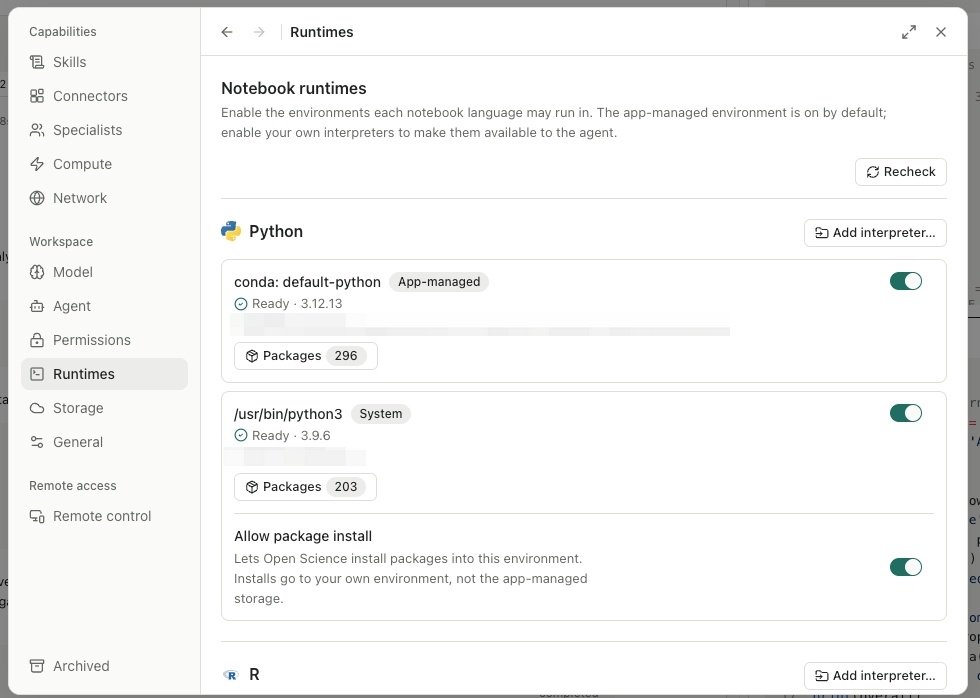
Supported Python interpreters can be detected or manually registered. Before selecting an existing interpreter, confirm the interpreter path, Python version, installed packages, filesystem and network access, and whether the environment may be changed by the agent or user.
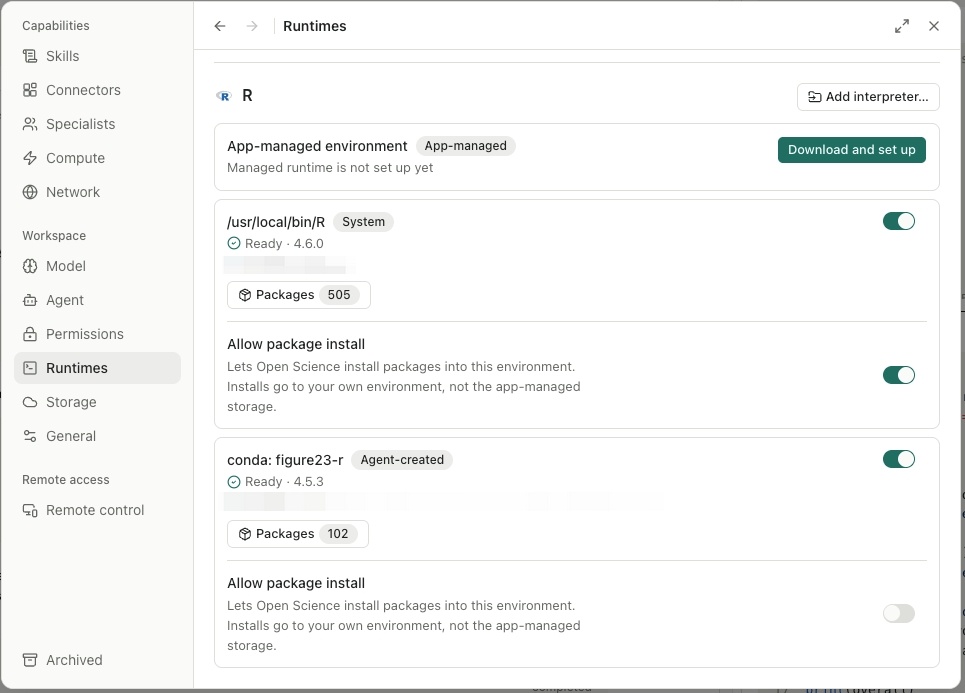
Current release notes describe R as managed-only. Use the app-managed R path and treat the installed version as the source of truth. Do not generalize the bring-your-own Python path to arbitrary R installations.
The read-only package inventory helps researchers inspect the selected runtime. Artifact Provenance may include the environment evidence Open Science could verify at creation time; confirm the selected Artifact's Provenance view rather than assuming every package row was captured. The inventory is an observation, not a dependency solver lock or portable environment restoration mechanism.
A Minimal Execution Walkthrough
Imagine that a project contains experiment_results.csv. The goal is to inspect data quality, calculate group summaries, and generate one figure.
- Choose the runtime deliberately. Select the environment that contains the required packages and check the installed-package inventory.
- Inspect the input. Ask the agent to report column names, types, missing values, and group counts before running a comparison.
- Run the analysis. Use Python or R to produce a summary table and plot. Require the agent to show the code and state its assumptions.
- Inspect the execution record. Review warnings, errors, package versions, missing-value handling, and output paths.
- Preserve the output. Open the generated Artifact and inspect its available Provenance. For a broader view of how Open Science structures tasks from prompt to output, see Plan → Execute → Artifact: How Open Science Turns Research Tasks into Traceable Outputs.
How Execution Evidence Reaches an Artifact
When the agent runs code to produce a table or figure, the project record may connect the referenced input file, the submitted code, output or errors, the observed runtime, the generated Artifact version, the producing message branch, and version-scoped Reviewer findings if enabled. Open Science only links evidence it can verify; if producer code, an input, or an environment observation is missing, Provenance should display that gap rather than infer it.
An execution record supports inspection. It does not prove that the code used the right statistical test or interpreted the result correctly. To understand how Provenance records are structured, see Artifact Versions and Provenance in Open Science.
Remote SSH Is an Additional Target
Local compute is not always enough. Open Science can register a remote SSH host as another execution target. This is useful when a trusted remote machine has more CPU or memory, a long-running analysis environment, institution-managed datasets, or packages that are impractical to install locally.
Commands and task data may move to the configured host. Authentication, host security, storage, software, data governance, and costs remain the researcher's responsibility. Remote compute is SSH-only; general Slurm submission, cloud-GPU provisioning, parallel sub-agent fan-out, and a local GPU backend are not built in. A more detailed walkthrough of Remote Compute will be covered separately.
Current Boundaries
As of Open Science v0.13.1:
- Python, R, and the persistent REPL use persistent control-plane kernels with durable code and output history.
- A separate bounded JavaScript evaluator is available for short inline checks.
- Shell commands are stateless and recorded in the run history.
- App-managed environments can be provisioned for Python and R.
- Supported Python interpreters can be detected or manually registered; R is managed-only.
- Package inventories are read-only observations, not portable environment locks.
- Remote execution is available through registered SSH hosts only.
- Portable environment restoration, deterministic reconstruction, and full-fidelity session replay remain roadmap work.
- Researchers remain responsible for package trust, code review, statistical validity, and interpretation.
Frequently Asked Questions
Do Python variables remain available between executions?
They can remain available within the active persistent Python kernel. Code and output history is durable, but do not assume in-memory state survives every restart, runtime replacement, or failure.
What is bounded REPL inference?
Added in v0.13.1, bounded REPL inference is a controlled JavaScript evaluator that lets the agent run short expressions inline without starting a full notebook session. It is useful for quick logic checks, not for full analyses. It does not necessarily share state with the persistent notebook kernels.
Are shell commands persistent?
No. Shell commands are stateless operations recorded in the run history. Files written to the workspace can remain there, but shell variables, working-directory changes, and running processes are not implicitly carried forward.
Can I use my own Python environment?
Supported Python interpreters can be detected or manually registered. Verify the interpreter path, packages, permissions, and installed app behavior before using it for important work.
Can I use my own R installation?
Current release notes describe R as managed-only. Use the app-managed R path and treat the installed version as the source of truth.
Does the package inventory make the environment reproducible?
No. It records observed packages and versions, but it is not a portable dependency lock or restoration mechanism. Check the specific Artifact's Provenance view to see what environment evidence was actually captured.
Does Open Science support HPC or GPU execution?
It supports registered remote SSH hosts. General Slurm orchestration, cloud-GPU provisioning, parallel sub-agent fan-out, and a local GPU backend are not currently built in.
Try It
Download the latest Open Science release and create a new project. Upload a small CSV, ask the agent to inspect the data and generate one figure, then open the Artifact Provenance view to see which execution evidence was linked.
Disclaimer
This article describes Open Science's code execution features for research workflow support. It does not constitute validated scientific conclusions. Open Science is a research workflow tool. It does not replace researcher judgment, and researchers remain fully responsible for evaluating the accuracy, completeness, and appropriateness of any outputs generated. All outputs require independent verification and expert interpretation before use in any research context.