Open Science v0.17.0: Specialist Marketplace and Vision Relay
Open Science v0.17.0 adds signed Specialist packages, persistent image-derived context for text-only models, context composition insights, and version-aware plan previews.
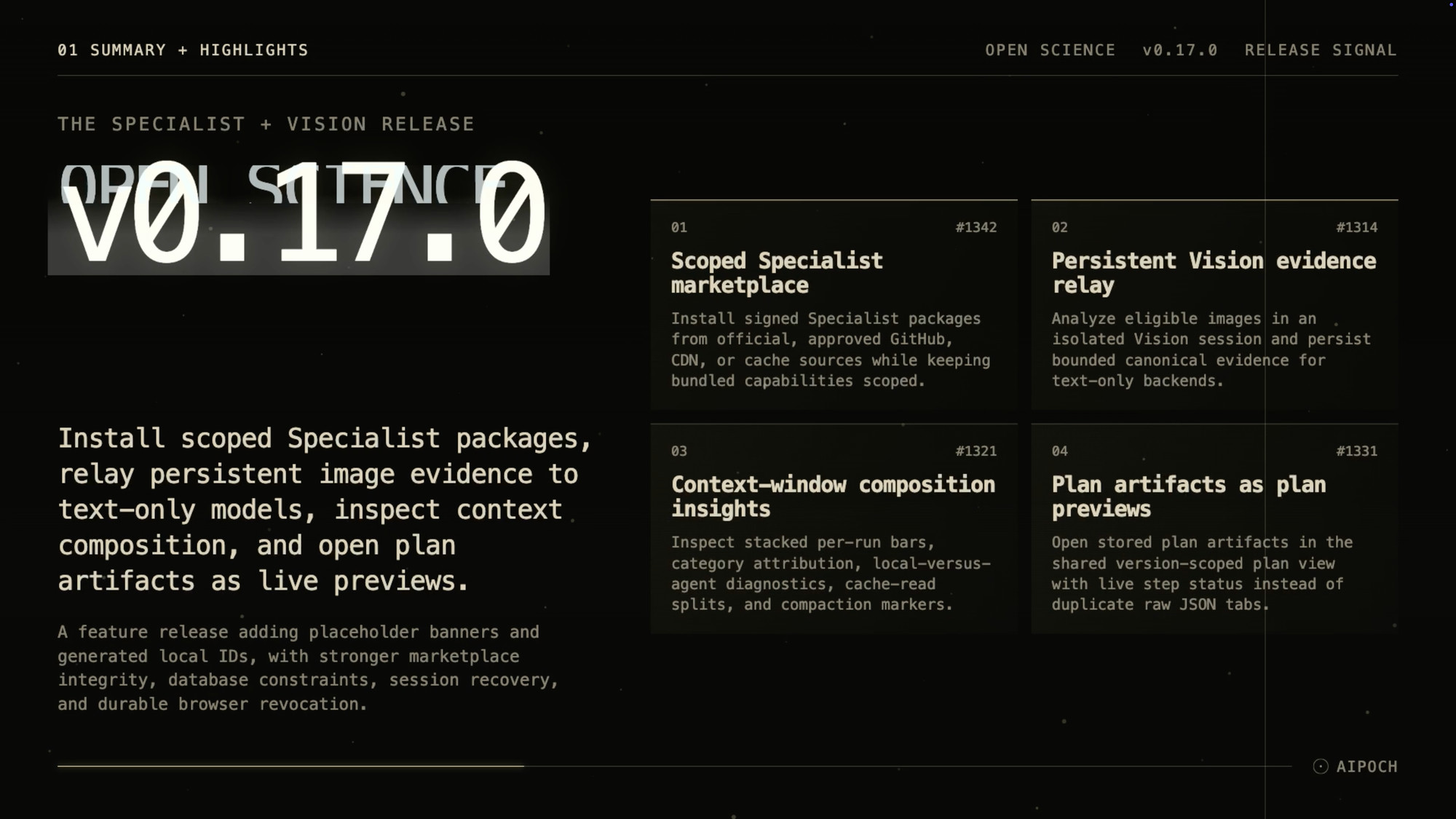
Open Science v0.17.0 makes specialist agents easier to distribute and research context easier to inspect. The release adds signed, Specialist-scoped packages; a persistent Vision relay that converts eligible images into bounded model-generated context for text-only backends; context-window composition insights; and version-aware plan previews.
Open Science is AIPOCH's open-source, model-agnostic AI workbench for scientific discovery — a self-hosted desktop app pairing a plan-and-execute agent with persistent compute, durable project/session storage, and inspectable research artifacts.
What v0.17.0 changes for researchers
This release focuses on two things:
- Reusable specialist agent capabilities. Signed Specialist packages keep bundled skills and connectors scoped to the specialist that ships them, while stable generated IDs make it easier to reference specialists and connectors in scripts, URLs, and marketplace packages.
- Clearer research context. A Vision evidence relay lets text-only backends reason about image-derived context, a context composition view shows what is filling the window, and stored plan artifacts render in the same readable plan surface used by active in-chat plans.
Build and reuse scoped Specialists
Scoped Specialist marketplace
Sharing or reusing a specialist configuration used to mean installing skills and connectors directly into the main agent session, where they could collide with other work or be deleted by accident. v0.17.0 introduces a scoped marketplace that keeps bundled skills and connectors tied to the specialist that ships them.
Specialists can be installed from the official GitHub marketplace, a user-approved GitHub source, a CDN fallback, or a cache fallback. Each install shows download progress and follows a verified install flow with signed metadata verification. Once installed, the specialist's skills and connectors are protected from accidental deletion and surfaced in Settings. If an imported skill conflicts with an already installed one, the app asks whether to reuse the existing skill or replace it with the incoming version.
This lets teams distribute specialist packages without polluting main agent sessions, and every install can be traced back to a signed source.
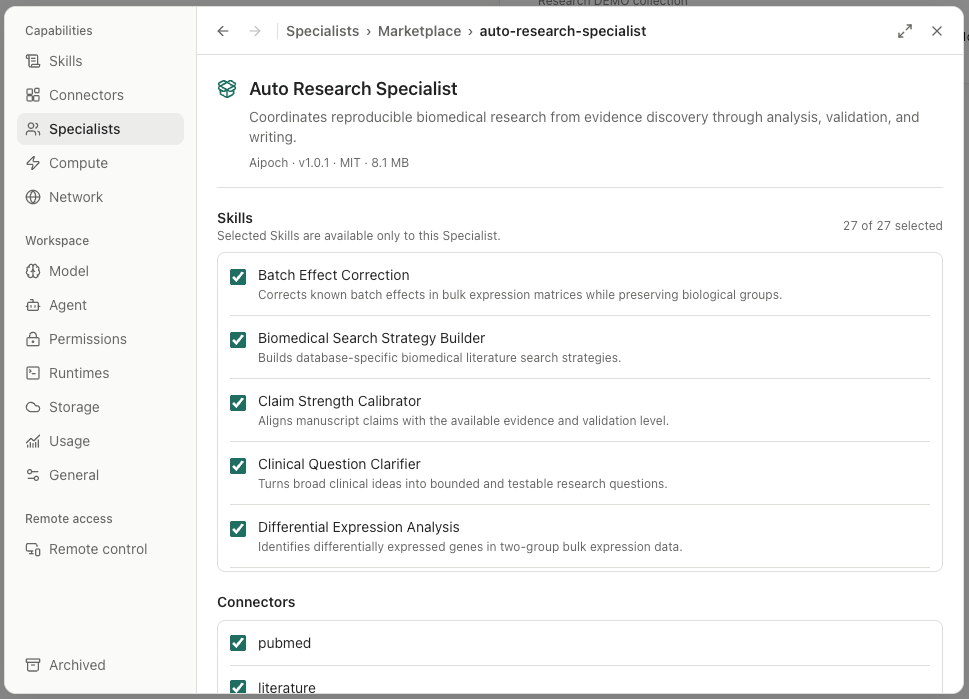
Marketplace signatures verify package source and integrity; they do not automatically audit a Specialist's instructions, Skill scripts, Connector behavior, dependencies, licenses, or scientific quality. Review third-party package contents and requested capabilities before enabling them.
The marketplace provides signed distribution and installation, but it is not yet a public community discovery or forking hub, and Open Science does not provide real-time multi-user collaboration.
Generated Specialist and Connector IDs
New local Specialist IDs are inferred from their names by normalizing case, whitespace, underscores, and repeated hyphens, with a UUID fallback when the result is unsafe, reserved, or colliding. An immutable ID control under Advanced settings previews the generated ID and permits a validated override. Connector local IDs use the same shared rules with an Advanced preview and immediate validation, and the main process enforces atomic cross-ID/name uniqueness.
This makes it easier to reference specialists and connectors in scripts, URLs, and marketplace packages without relying on random identifiers.
Before upgrading: Specialist packages exported before v0.17.0 must rename
displayName,systemPrompt,skillIds, andconnectorIdsto their snake_case equivalents (display_name,system_prompt,skill_ids,connector_ids) before reimport. TypeScript application APIs remain camelCase.
Let text-only backends work from derived image context
Text-only model backends cannot process raw images. Before v0.17.0, Open Science did not provide a persistent relay path for text-only backends working with eligible images. v0.17.0 adds a persistent Vision evidence relay that lets text-only backends work with image-derived information.
A dedicated Vision model selector under Settings validates the chosen model against the provider catalog, framework, image-input capability, and transport restrictions. When the active backend is text-only, eligible images are analyzed in an isolated, tool-less Vision session and replaced with bounded canonical evidence — summary, findings, transcription, regions, entities, relations, and uncertainty. The evidence is persisted in SQLite as a derived cache and reused across app restarts, context resets, historical replay, and model changes. Native image-capable backends keep the direct image path. If relay preparation fails for a current image, it fails closed; historical replay surfaces an explicit omission notice.
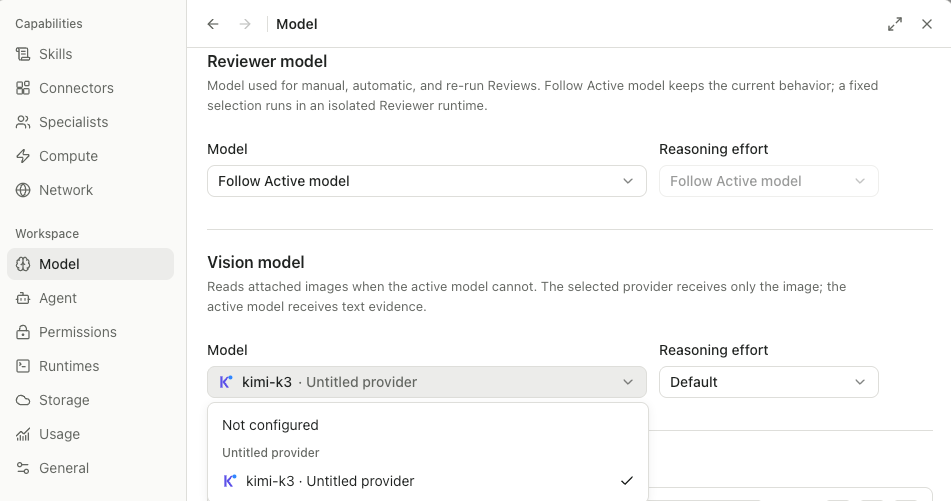
When the selected Vision model is hosted remotely, eligible images are sent to that configured provider for analysis. The derived canonical evidence is then stored locally in SQLite and supplied to the text-only backend instead of the raw image. Review the provider and image sensitivity before enabling the relay.
The relay output is a model-generated, bounded representation of the image for downstream context. It does not replace the original image, guarantee correct transcription or interpretation, or constitute independent scientific validation.
Researchers can now use text-only backends in workflows that include eligible images by supplying them with a bounded, model-generated representation of each image, while image-capable models continue to receive the original images.
See what the agent is carrying forward
Context-window composition insights
It is hard to tell what is filling the context window and why a long session may be approaching its limit. v0.17.0 adds composition insights to the context dialog so the contents of the window are visible.
The dialog breaks context use into messages, tool activity, cache reads, and other attributed categories across recent runs, while marking where compaction occurred. A live composition summary appears at the top, falling back to the newest persisted sample. Horizontally scrollable stacked bars — one per visible terminal run — display hover or focus previews and can be pinned with click, Enter, or Space.
This makes it easier to see which messages, tool results, and cache reads consume space and to decide when to compact or branch the conversation.
Plan artifacts as version-aware previews
Stored plan artifacts used to open as raw JSON in a duplicate tab, which made it hard to read the plan and track step status. v0.17.0 redirects stored plan artifacts to the shared plan document view.
Opening a plan artifact from the Files tab, global search, or artifacts list now renders the version-scoped session plan tool tab used by in-chat plan entries. When a stored projection matches the previewed version, live step status is shown; otherwise a read-only all-not-started snapshot appears with an explanatory banner. A raw-JSON toggle remains available, and the plan header shows the real on-disk artifact name.
Saved plans now use the same readable plan document surface as in-chat plans, while clearly distinguishing live matching projections from historical read-only snapshots.
Reliability improvements you will notice
- Sessions and approvals. Pending approvals no longer stall after lifecycle transitions, resumed sessions renew their timeout when the provider makes progress or reconnects, durable elicitation is preserved across resume, and the composer message queue is retained when switching projects.
- Outputs and files. Rapidly interleaved stream chunks no longer drop text prefixes, read-only file references are snapshotted before agent mutations can race them, artifact source session reviews are loaded for reviewers, and session files written by a newer app version are rejected cleanly instead of failing mid-load.
- Runtime and security. Remote-access browser revocation survives restart, internal host errors are redacted before reaching agent-facing surfaces, and agent runtime query errors now fail closed instead of returning stale data.
Other hardening — including SQLite CHECK domain constraint enforcement, session-plan model context overhead reduction, centralized terminal deletion, marketplace install integrity, bounded event reconnect recovery, and single CAS agent updates — is documented in the full release notes.
Before you upgrade
- Specialist packages exported before v0.17.0 must update their external
specialist.jsonfrom camelCase to snake_case fields (display_name,system_prompt,skill_ids,connector_ids) before reimport. TypeScript application APIs remain camelCase. - Windows builds are unsigned and may show a SmartScreen prompt on first launch. macOS builds are Developer ID signed and notarized by Apple.
- Vision relay images may leave the local machine when the selected Vision model is hosted remotely. Review provider terms and image sensitivity before enabling the relay.
Install or update
Open Science v0.17.0 supports macOS 12+ on Apple Silicon and Intel, Linux x64, and Windows 10/11 x64. Download the installer for your platform from the GitHub release page, or build from source with npm install followed by npm run build:mac, npm run build:linux, or npm run build:win.
Resources
- Open Science v0.17.0 Release Notes
- AIPOCH Open Science
- AIPOCH
- How Skills and Connectors extend your Open Science agent
- Artifact version provenance in Open Science
- Agent permissions in Open Science
FAQ
Where can Specialist packages be installed from?
v0.17.0 supports the official GitHub marketplace, user-approved GitHub sources, a CDN fallback, and a cache fallback. Every source is verified through signed metadata before the install completes.
What happens to image evidence when I restart or change models?
The Vision evidence relay persists canonical evidence in SQLite. The same evidence is reused across app restarts, context resets, historical replay, and model changes as long as the active backend remains text-only.
What changed in specialist.json for packages?
The external specialist.json now uses snake_case fields: display_name, system_prompt, skill_ids, and connector_ids. Legacy camelCase files are rejected, so pre-v0.17.0 packages must be updated before reimport. TypeScript APIs remain camelCase.
Which platforms does Open Science v0.17.0 support?
It supports macOS 12+ on Apple Silicon and Intel, Linux x64, and Windows 10/11 x64. macOS builds are signed and notarized; Windows builds are unsigned and may trigger a SmartScreen prompt.
What does the context-window composition view show?
It breaks context use into messages, tool activity, cache reads, and other attributed categories across recent runs, while marking where compaction occurred.
Disclaimer
Open Science is a research workflow tool. It assists with planning, execution, file management, delegation, and provenance tracking, but it does not replace scientific judgment, domain validation, or peer review.