How to Compute ESTIMATE Immune Score from Bulk RNA-Seq? An AI Agent Workflow
AIPOCH's Estimate Immune Score Analysis skill computes ImmuneScore, StromalScore, and TumorPurity from bulk RNA-seq expression matrices with structured heatmap and grouped comparison outputs.An optional sample group file can also be provided in CSV or TSV format. This file is used for grouped boxplots and significance testing when researchers want to compare ESTIMATE scores across predefined sample groups.
The Estimate Immune Score Analysis skill from AIPOCH is an AI agent skill helps researchers run ESTIMATE-based tumor microenvironment scoring from compatible tumor bulk RNA-seq or microarray expression matrices. Despite commonly used upstream exploratory analysis, running ESTIMATE reproducibly requires manual R scripting, gene identifier formatting, platform-specific parameter management, and separate visualization code for heatmaps and grouped comparisons. The workflow can generate StromalScore, ImmuneScore, ESTIMATEScore, and TumorPurity outputs when available. AIPOCH offers this skill through its Medical Research Agent Skills library to help researchers automate and reuse this workflow with ease.
What the Estimate Immune Score Analysis Skill Does?
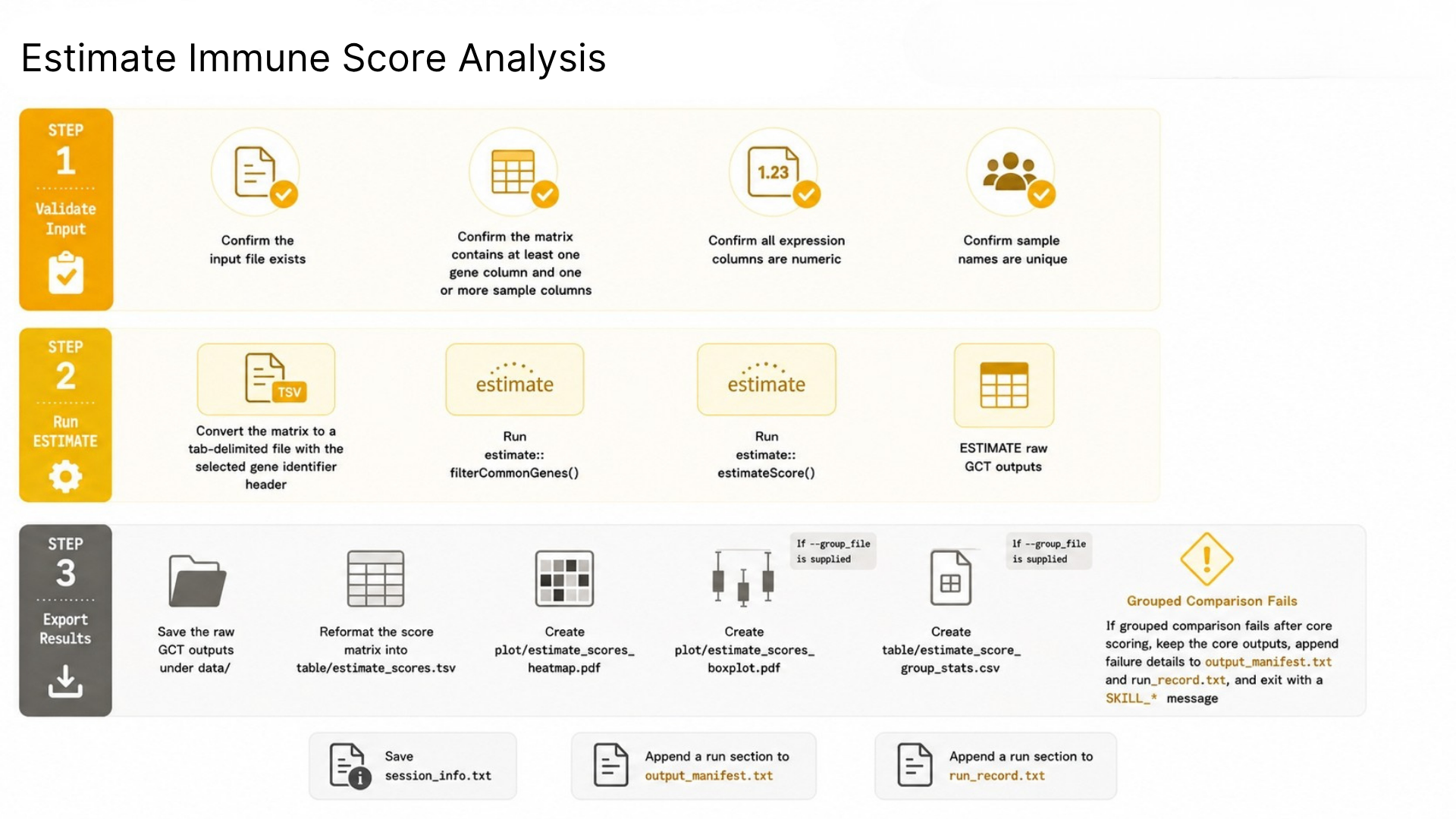
Given a bulk transcriptomic expression matrix, this skill runs the ESTIMATE workflow, generates standardized score outputs, and produces an ESTIMATE score heatmap. When a sample group file is also provided, it additionally performs group-wise score comparison and exports boxplots plus significance summary tables, supporting fast and standardized tumor microenvironment analysis.
The skill is open-source and available in the AIPOCH medical research skills repository on GitHub.
When Not to Use this skill?
- Immune cell fraction estimation: use a CIBERSORT-like deconvolution workflow instead
- Differential testing between biological groups: use a differential analysis skill instead
- Single-cell analysis: use a single-cell-specific workflow
- Clinical diagnosis or treatment decision support: do not use this skill
Input Validation
This skill accepts:
- one bulk expression matrix in CSV or TSV format with genes in the first column and samples in the remaining columns
- an optional sample group file in CSV or TSV format for grouped boxplots and significance testing
- requests to compute ESTIMATE-derived StromalScore, ImmuneScore, ESTIMATEScore, TumorPurity, and related visualizations from bulk transcriptomic data
Output Files
| File | Description |
|---|---|
data/expression_input.tsv | Tab-delimited expression matrix prepared for ESTIMATE |
data/estimate_input.gct | GCT file created by estimate::filterCommonGenes() |
data/estimate_score.gct | Raw ESTIMATE score output from estimate::estimateScore() |
table/estimate_scores.tsv | Reformatted sample-by-score table |
plot/estimate_scores_heatmap.pdf | Sample-level ESTIMATE score heatmap |
table/estimate_score_group_stats.csv | Per-score p-values and the group with the higher median score when --group_file is provided |
plot/estimate_scores_boxplot.pdf | ESTIMATE score boxplot when --group_file is provided |
session_info.txt | R session and package version information |
output_manifest.txt | Append-only output file manifest with descriptions |
run_record.txt | Append-only run record with parameters, runtime, and output summary |
How to Run ESTIMATE Immune Score Analysis with AI: Step-by-Step Workflow
The example is for demonstration purposes only. Sample data, model parameters, and output values shown are illustrative and do not represent any real clinical cohort or validated research
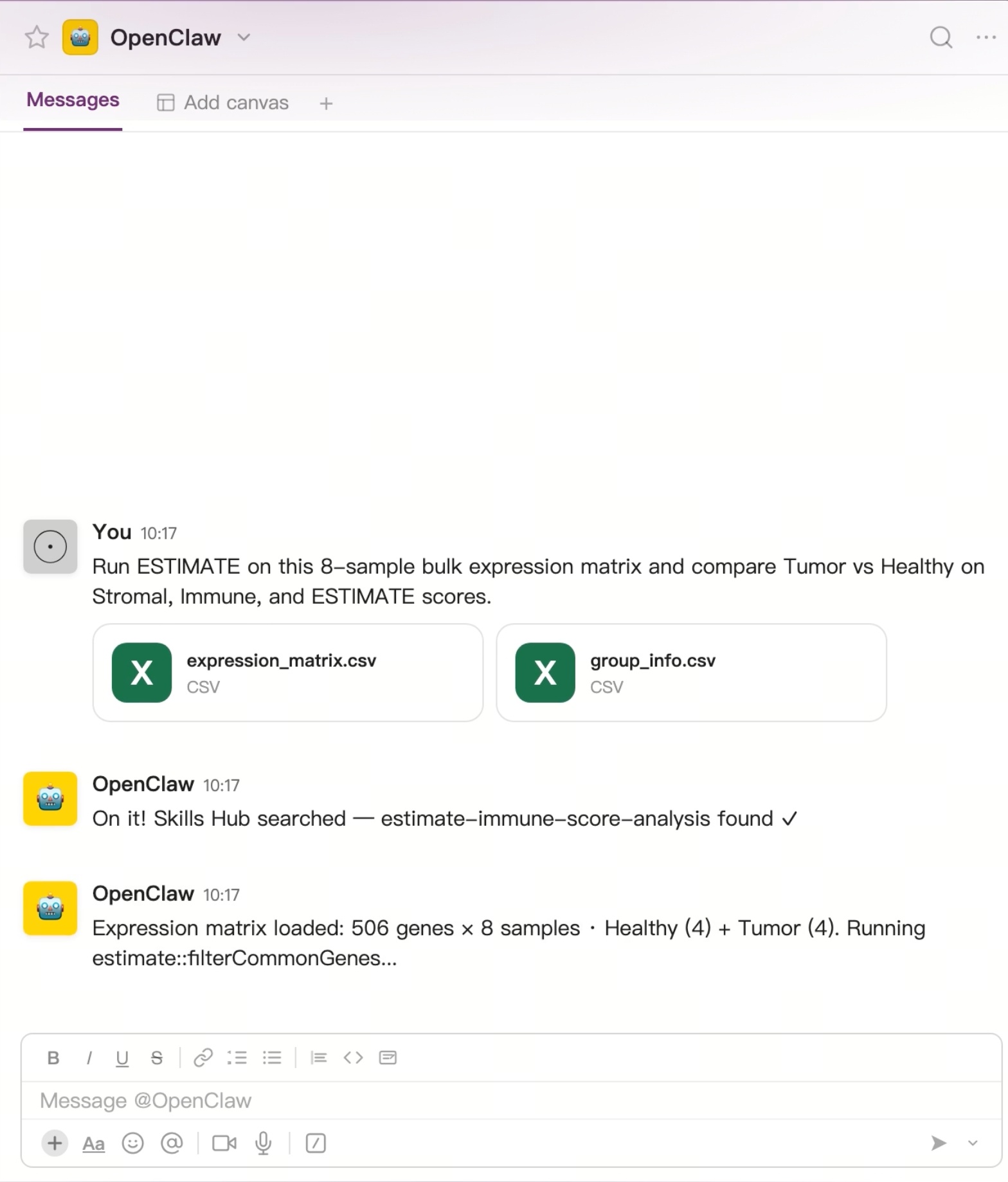
The two images below show a demo of the expected workflow when running the estimate-immune-score-analysis skill via OpenClaw.
Step 1 — Prepare Your Inputs
The researcher prepares two CSV files:
Then uploads both files to the AI agent and types a natural language request:
Run ESTIMATE on this 8-sample bulk expression matrix and compare Tumor vs Healthy on Stromal, Immune, and ESTIMATE scores.
Step 2 — Execute the ESTIMATE Scoring Workflow
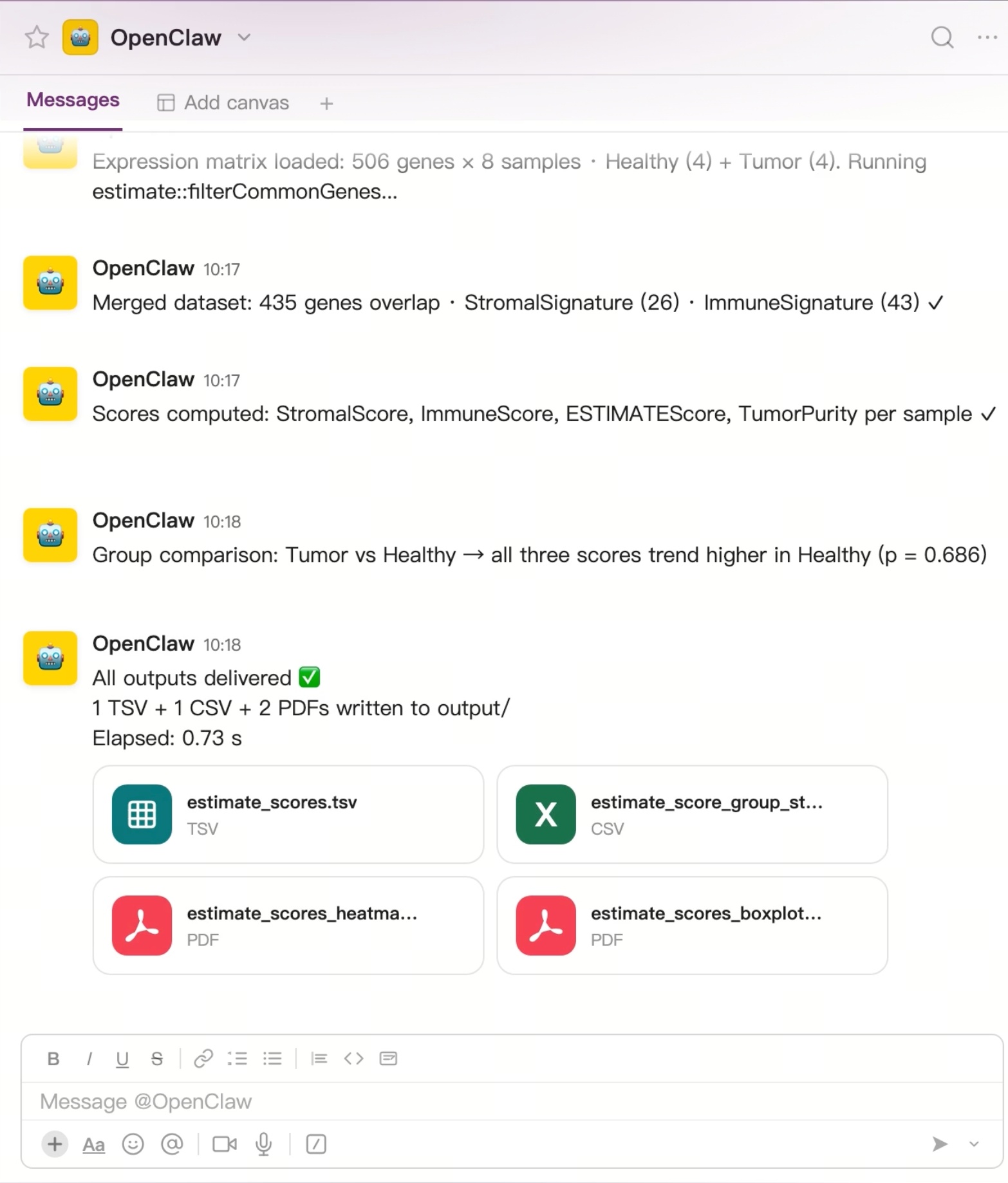
AI agent locates and runs the skill, walking through these stages:
- Searches Skills Hub → finds AIPOCH
estimate-immune-score-analysis - Loads the expression matrix and validates sample groups
- Filters to overlapping genes and identifies Stromal/Immune signature genes
- Computes StromalScore, ImmuneScore, ESTIMATEScore, and TumorPurity per sample
- Runs group comparison (Tumor vs Healthy) and reports statistics
Step 3 — Review Structured Outputs
| File | Format | Content |
|---|---|---|
| estimate_scores.tsv | TSV | Per-sample raw scores |
| estimate_score_group_stats.csv | CSV | Group-level statistics |
| estimate_scores_heatmap.pdf | Score heatmap across samples | |
| estimate_scores_boxplot.pdf | Boxplot comparing Tumor vs Healthy |
Watch the Full Demo
Want to see how an AI agent runs ESTIMATE immune score analysis? Watch the complete workflow demonstration on YouTube, including data upload, analysis execution, and structured result generation.
Watch the video:
R Package (Manual) vs. AIPOCH Agent Skill: Workflow Comparison
| Task | R Package (Manual) | AIPOCH Agent Skill |
|---|---|---|
| Format expression matrix for ESTIMATE | Manual R scripting across multiple steps | Skill handles matrix preparation and gene identifier conversion |
| Run filterCommonGenes + estimateScore | Sequential R calls requiring package setup | CLI entry point executes both steps in sequence |
| Generate ESTIMATE score heatmap | Separate visualization script required | Heatmap PDF produced with each run |
| Grouped boxplot + significance table | Additional custom R code per comparison | Optional group file activates boxplot and stats table output |
| Record run parameters and outputs | Manually noted or informally tracked | run_record.txt and output_manifest.txt maintained automatically |
| Error diagnosis | Manual inspection of R console output | Structured SKILL_* error codes with defined resolutions |
| Reproducible re-execution | Seed must be set and tracked manually | --seed parameter recorded in run record for every run |
Who Can Use ESTIMATE Immune Score Analysis
Biomedical researchers running bulk RNA-seq or microarray analyses who need ESTIMATE-based ImmuneScore and StromalScore computation as part of a larger bioinformatics workflow are the primary users. Computational biologists preprocessing TCGA or GEO datasets, bioinformaticians organizing tumor microenvironment scoring for downstream signature or prognosis analyses, systematic review teams building evidence tables around immune contexture, translational medicine teams structuring TME data for comparative analysis, and graduate students learning reproducible bioinformatics workflows may all find this skill useful as a structured workflow support tool.
Conclusion
The Estimate Immune Score Analysis skill from AIPOCH is an AI agent skill designed to help researchers compute ESTIMATE immune score analysis outputs — ImmuneScore, StromalScore, ESTIMATEScore, and TumorPurity — from bulk RNA-seq or microarray expression matrices. It can assist researchers in reducing repetitive manual preprocessing steps in the estimate R package workflow, organizing tumor microenvironment scoring outputs into standardized files, and supporting reproducible execution through seed control and append-only run records. All outputs require independent researcher interpretation before use in any research context.
AIPOCH is a collection of Medical Research Agent Skills created to support AI-assisted biomedical research workflows across literature review, evidence organization, bioinformatics preprocessing, data analysis support, and research writing tasks. Explore the full AIPOCH skill library or browse the medical research skills source repository.
Recommended Reading
- CIBERSORT Immune Infiltration Analysis
- ssGSEA Immune Infiltration Analysis with AI
- AI Immune Pathway Analysis Workflow
FAQ
What input does the Estimate Immune Score Analysis skill require?
The skill requires one bulk expression matrix in CSV or TSV format, with genes in the first column and samples in the remaining columns.
An optional sample group file can also be provided in CSV or TSV format. This file is used for grouped boxplots and significance testing when researchers want to compare ESTIMATE scores across predefined sample groups.
Can the skill be used with RNA-seq data?
Yes. The skill can be used with normalized bulk RNA-seq expression matrices, such as log2(TPM + 1). Raw count matrices are not recommended.
What is this skill not intended for?
This skill is not designed for immune cell deconvolution, single-cell analysis, differential expression, clinical diagnosis.
Disclaimer
This article is intended for informational purposes only and does not constitute medical advice, clinical guidance, diagnostic recommendations, treatment decisions, or validated scientific conclusions.
Any sample data, model parameters, output values, or workflow examples shown in this article are for demonstration purposes only. They do not represent real clinical cohorts, validated research findings, or guaranteed results from use of the skill.
The Estimate Immune Score Analysis skill available through AIPOCH is a research workflow support skill. All outputs it produces require independent verification and expert interpretation before use in any research or clinical context. The skill does not replace researcher judgment, and researchers remain fully responsible for evaluating the accuracy, completeness, and appropriateness of any outputs generated.
References and external links in this article are provided for informational purposes. AIPOCH does not endorse and is not responsible for the content of third-party sources.